
- BigCommerce App Development · Admin Dashboard · UI/UX Design
Tellason BigCommerce Sticky Add to Cart Scroll Trigger CRO
Type
BigCommerce Stencil Development · CRO · Custom JavaScript
Role
Full-Stack Developer Client Tellason, United States
Stack
BigCommerce Stencil · JavaScript · Custom CSS
- App Dev Framework
- REST API v3
- OAuth 2.0
- Webhooks
- BigDesign
- React
- Node.js

01
- before
The Problem
Tellason sells premium handcrafted clothing at $225 to $275+ per item. Customers buying at that price point do not impulse purchase they read. They check the fabric weight, the construction details, the fit description, the sizing notes. On the Fatigue Pant – Black Sateen Original Tapered Leg, the product description includes 8.5 oz Italian-milled cotton sateen, OG-107 construction details, a note from founders Tony Patella and Pete Searson, a product video, care instructions, and Afterpay payment information.
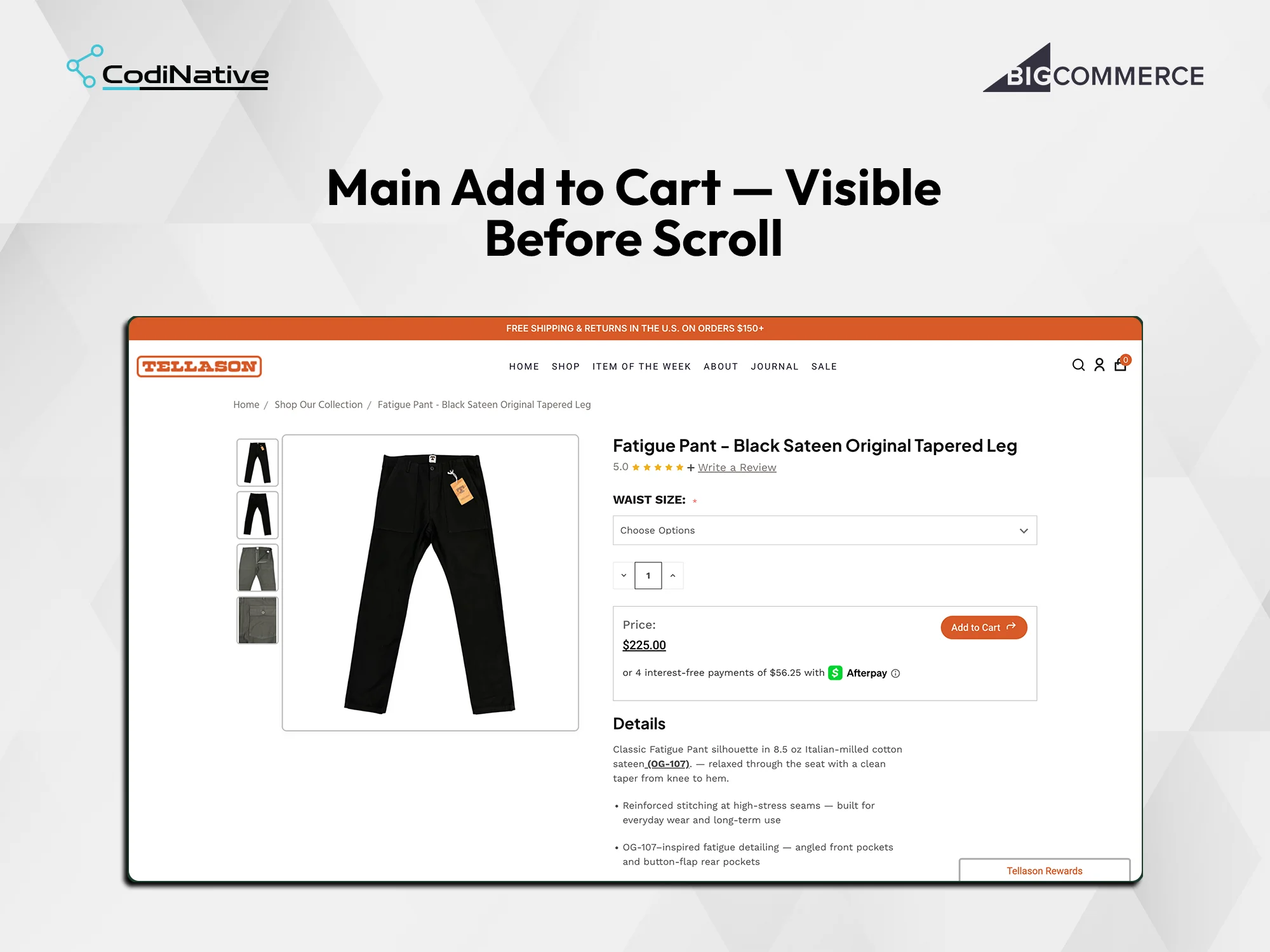
By the time a customer finishes reading, the Add to Cart button is completely out of view it lives near the top of the page beside the product image. The purchase moment arrives at the bottom of the page. The button is at the top. The customer has to scroll back up to act.
BigCommerce Stencil has no native solution for this. There is no built-in sticky Add to Cart, and adding one requires custom JavaScript without modifying the core theme files.
BigCommerce’s default product structure handles each of these as a separate product on a separate page. A customer who wanted a complete set had to visit the scrub top page, choose a color and size, add to cart, navigate back, find the matching pants, choose the same color, choose a different size because pants fit differently, add to cart again, then find the scrunchie separately. Three pages, three separate add-to-cart actions, and a color coordination problem the customer had to manage themselves across multiple browser tabs.
The existing flow made a simple purchase feel fragmented. Customers who landed expecting to buy a set had to work to assemble one. That friction costs conversions particularly for a brand whose entire identity is the coordinated set.
02
- After
The Solution
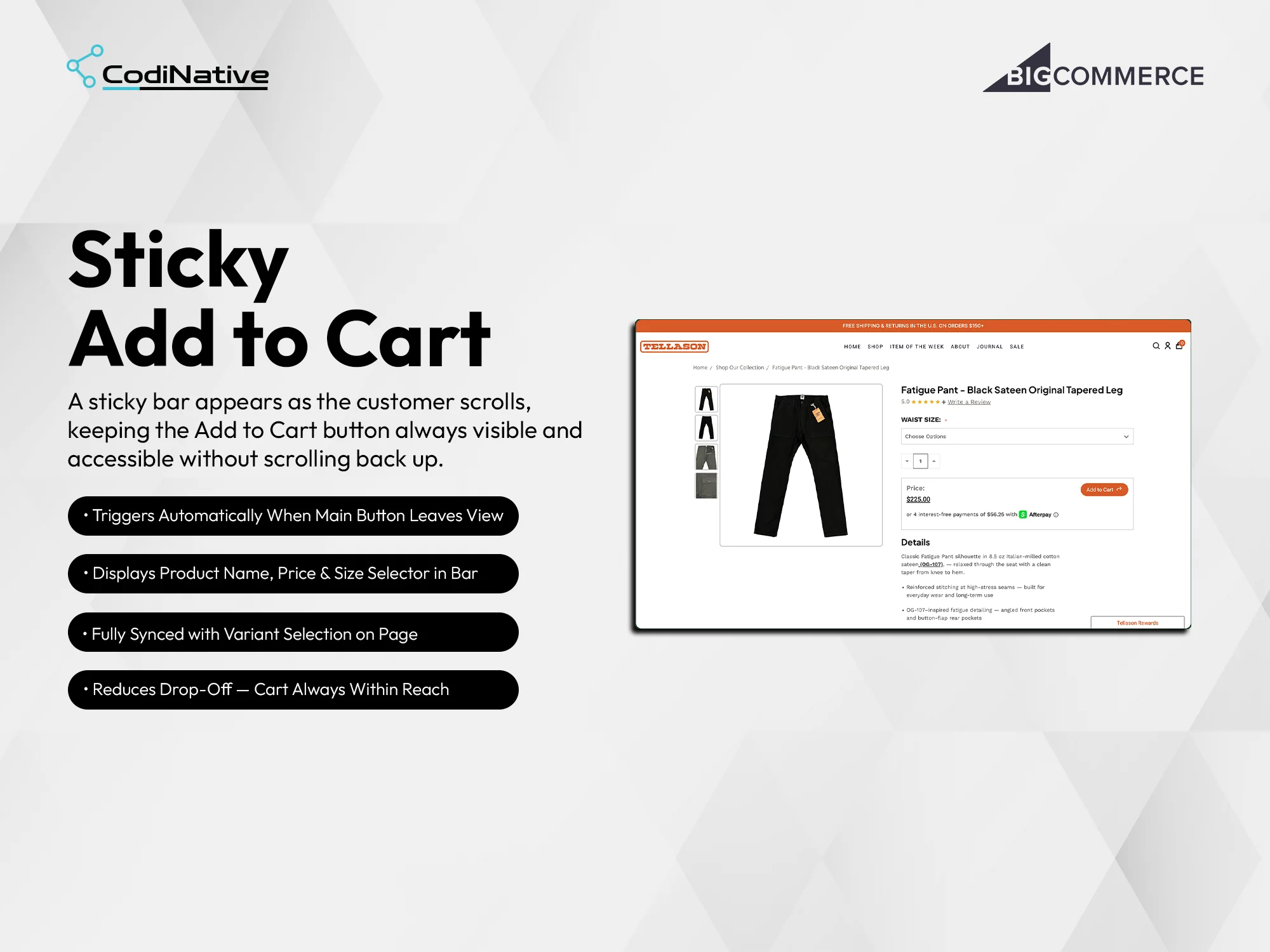
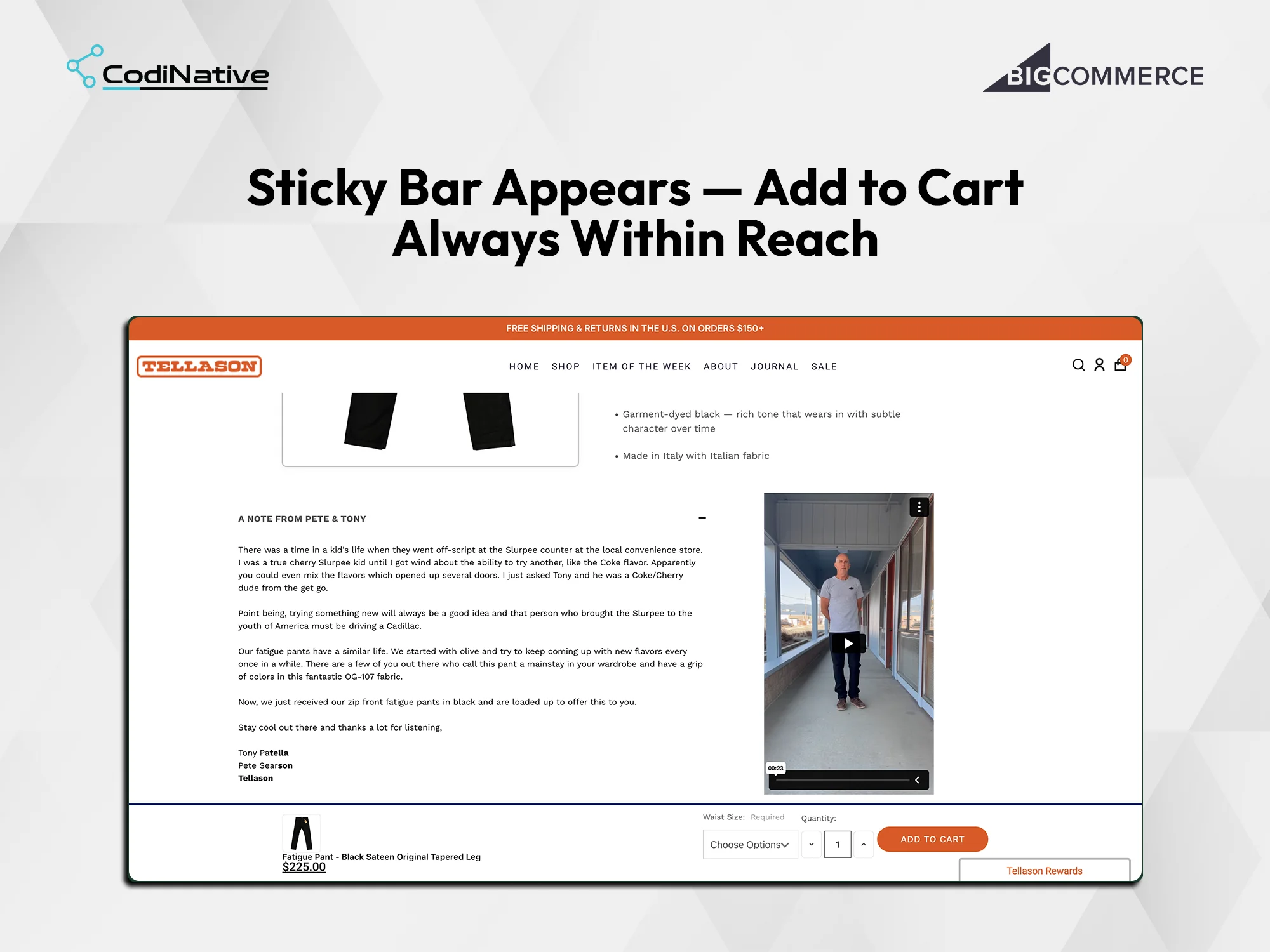
Codinative built a custom scroll-triggered sticky Add to Cart bar using JavaScript on BigCommerce Stencil. When the customer scrolls past the original Add to Cart button, a polished bar smoothly animates in at the bottom of the screen showing the product thumbnail, product name, price, size selector, and a fully functional Add to Cart button. When the customer scrolls back up to the original button, the sticky bar disappears cleanly. No conflicts, no duplicate submissions, no theme modifications.
Project Framework
Situation · Task · Action · Result
S Situation
Tellason’s product pages had one static Add to Cart button placed near the top. Customers who scrolled down to read details, check sizing, or review the Afterpay option lost sight of the button completely losing the purchase moment at exactly the point where buying intent was highest.
T Task
Keep the purchase action visible at all scroll depths without redesigning the product page or modifying the core BigCommerce Stencil theme files.
A Action
Built a custom JavaScript scroll listener that uses an IntersectionObserver to detect when the original Add to Cart button exits the viewport. When the original button is out of view, a sticky bar animates in at the bottom of the screen product thumbnail, product name, price, size selector synced with the page’s variant selection, and a functional Add to Cart button. When the original button re-enters the viewport on scroll up, the sticky bar dismisses cleanly.
R Result
The Add to Cart button is now visible at every scroll depth on every product page visit. For a store selling $200+ premium items where customers naturally read carefully before buying, keeping the purchase CTA permanently in reach directly reduces drop-off at the decision moment.
- Approval Workflow
- Branded Emails
- REST API v3
- OAuth 2.0
- Webhooks
Core Features
Five capabilities that make this more than a form.
01
Feature 01
Scroll-Triggered Appearance via IntersectionObserver
The sticky bar does not appear on page load it would compete with the native Add to Cart button and create visual noise for customers who have not yet decided to scroll. The trigger is precise: the bar appears the moment the original Add to Cart button exits the top of the viewport on a downward scroll, and disappears the moment it re-enters on an upward scroll.
This is implemented using the browser’s IntersectionObserver API targeting the original button element. The observer fires a callback when intersection with the viewport changes isIntersecting: false on scroll past triggers the bar to animate in, isIntersecting: true on scroll back triggers the bar to animate out. No polling, no scroll event listener running on every frame IntersectionObserver fires only on state change, so there is no performance cost during normal scroll.
Feature 02
Sticky Bar Content: Product Name, Price, Size Selector, Add to Cart
The sticky bar at the bottom of the screen on the Tellason product page shows four elements: a product thumbnail on the left, the full product name Fatigue Pant – Black Sateen Original Tapered Leg the price $225.00 a Waist Size dropdown labeled Required with Choose Options, a quantity stepper, and the orange Add to Cart button matching Tellason’s brand color.
The size selector in the sticky bar is synced with the size selector on the main product page. If a customer selects a waist size on the main page before scrolling, that selection is already populated in the sticky bar’s dropdown. If they select a size in the sticky bar, that selection reflects in the main page selector. The two controls are bound to the same underlying Stencil variant selection state there is no duplication of logic and no risk of conflicting variant selections sending the wrong SKU to cart.
02
03
Feature 03
Zero Theme Modification
The sticky bar is injected into the page through a custom JavaScript file and styled through a separate CSS file. No Stencil template files no templates/pages/product.html, no templates/components/products/add-to-cart.html are modified. The bar is appended to the DOM by the JavaScript on page load and remains hidden until the scroll trigger fires.
This means theme updates from BigCommerce or from Tellason’s development team do not affect the sticky bar. It sits outside the theme’s component tree. A full Stencil theme update or a Cornerstone version bump does not touch the sticky bar files, and the sticky bar does not touch any theme files. The implementation is self-contained and maintenance-free after deployment.
Core Features
Architecture
| Layer | Technology |
|---|---|
|
Storefront
|
BigCommerce Stencil
|
|
Scroll Detection
|
IntersectionObserver API
|
|
Bar Injection
|
JavaScript DOM append on page load
|
|
Variant Sync
|
Shared Stencil variant state binding
|
|
Styling
|
Custom CSS Tellason brand system
|
|
Theme Impact
|
Zero no Stencil template files modified
|
What Was Shipped
Deliverables
Custom JavaScript scroll listener using IntersectionObserver fires on state change, not on every scroll frame
Sticky bar injected via JavaScript product thumbnail, product name, price, size selector, Add to Cart button
Size selector in sticky bar synced to main page variant selection in both directions
Smooth animate-in when original button exits viewport, clean animate-out when it re-enters
Zero Stencil theme modification implementation lives in separate JS and CSS files only
Works across all product pages on the Tellason store without per-product configuration
Who This App Is Built For
High-SKU product catalogues
on BigCommerce where product pages are long and the Add to Cart button consistently leaves the viewport before customers finish reading.
Fashion and apparel merchants
where variant selection size, color, fit happens mid-scroll and the purchase button needs to stay accessible through the entire decision process.
Electronics and technical product merchants
where specification tables, comparison sections, and detailed descriptions push the native Add to Cart button far out of view by the time a customer is ready to buy.
Any BigCommerce merchant running conversion rate optimization
who wants to reduce scroll-back friction on product pages without modifying Stencil theme files or committing to a per-theme development engagement every time the theme updates.
Common Questions
Frequently Asked Questions
What is a scroll-triggered sticky Add to Cart bar on BigCommerce?
A scroll-triggered sticky Add to Cart bar is a UI element that stays fixed at the bottom of the product page viewport and appears automatically when the customer scrolls past the original Add to Cart button. It keeps the purchase action accessible at every scroll depth without the customer needing to scroll back up. On BigCommerce Stencil it requires custom JavaScript there is no native equivalent.
Does the sticky bar conflict with the original Add to Cart button?
No. The sticky bar appears only when the original button is out of view and disappears when the original button comes back into view. At no point are both buttons visible simultaneously. The IntersectionObserver monitors the original button's viewport intersection state and the sticky bar's visibility toggles directly off that state they are never both visible at the same time.
How does the quote request integrate with BigCommerce B2B Edition?
Both the sticky bar's size dropdown and the main product page's size dropdown are bound to the same underlying Stencil variant selection object. A selection in either control updates the shared state. The other control reads from that same state. There is one source of truth for the selected variant the sticky bar does not maintain a separate selection state.
How does the size selector in the sticky bar stay in sync with the main page?
No. The sticky bar is injected into the DOM by a JavaScript file that loads on the product page. No templates/pages/product.html or any other Stencil template file is modified. Theme updates, Cornerstone version bumps, and Stencil CLI deployments do not affect the sticky bar because it lives outside the theme's component tree entirely.
Does building this require modifying BigCommerce Stencil theme files?
No. The sticky bar is injected into the DOM by a JavaScript file that loads on the product page. No templates/pages/product.html or any other Stencil template file is modified. Theme updates, Cornerstone version bumps, and Stencil CLI deployments do not affect the sticky bar because it lives outside the theme's component tree entirely.
Does the scroll listener affect page performance?
No. The implementation uses the IntersectionObserver API rather than a scroll event listener. An event listener on the scroll event fires on every frame during scrolling potentially 60 times per second and can cause jank on lower-powered devices. IntersectionObserver fires only when the observed element's intersection state changes, which happens at most twice per user scroll session once on the way down and once on the way up.
Can this be implemented on other BigCommerce Stencil stores?
Yes. The implementation IntersectionObserver targeting the native Add to Cart button, DOM-injected sticky bar, variant state binding, and zero theme modification applies to any BigCommerce Stencil store. The product name, price, and variant selector elements it reads from are standard Stencil data attributes present on every BigCommerce Stencil product page.
- Verified BigCommerce Partner
Codinative is a verified BigCommerce Partner. Every project is BigCommerce only — no split focus across platforms
Codinative is a verified BigCommerce Partner. Custom Stencil features, CRO implementations, B2B Edition, Catalyst storefronts, REST API v3 integrations BigCommerce only. Every project, every developer, every day.