
- BigCommerce App Development · Conversion
Sticky Add to Cart Bar: BigCommerce App Development
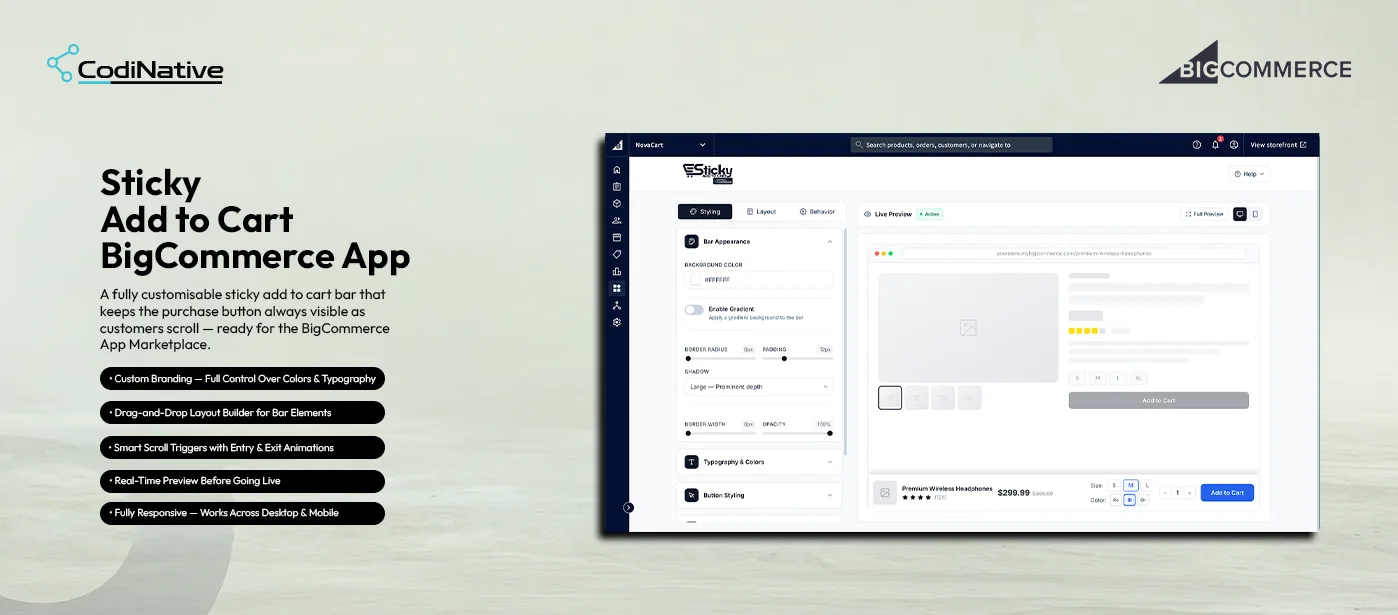
- before
The Problem: The Purchase Button Disappears on Every Long Product Page
On most BigCommerce product pages, the Add to Cart button lives near the top just below the product image and price. The moment a customer scrolls down to read the description, check the size guide, compare variants, or browse reviews, the button disappears entirely.
That disappearance has a direct cost. A customer who is ready to buy has to scroll back up to act. On long product pages technical specs, size guides, ingredient lists, multi-variant selectors that friction is enough to cause a drop-off. The customer loses momentum. The sale does not happen.
BigCommerce has no native fix for this. There is no built-in sticky bar, no scroll-triggered purchase button, and no way for a merchant to keep the Add to Cart action permanently visible without custom Stencil development on every theme development that breaks every time the theme updates.
- After
The Solution: A Fully Customizable Sticky Bar App With No Stencil Edits
Codinative built a custom BigCommerce app that injects a fully customizable sticky add-to-cart bar into any product page installed natively through the BigCommerce App Development Framework, deployed into the storefront through the Scripts API, and configured entirely from a centralized admin dashboard inside the BigCommerce control panel.
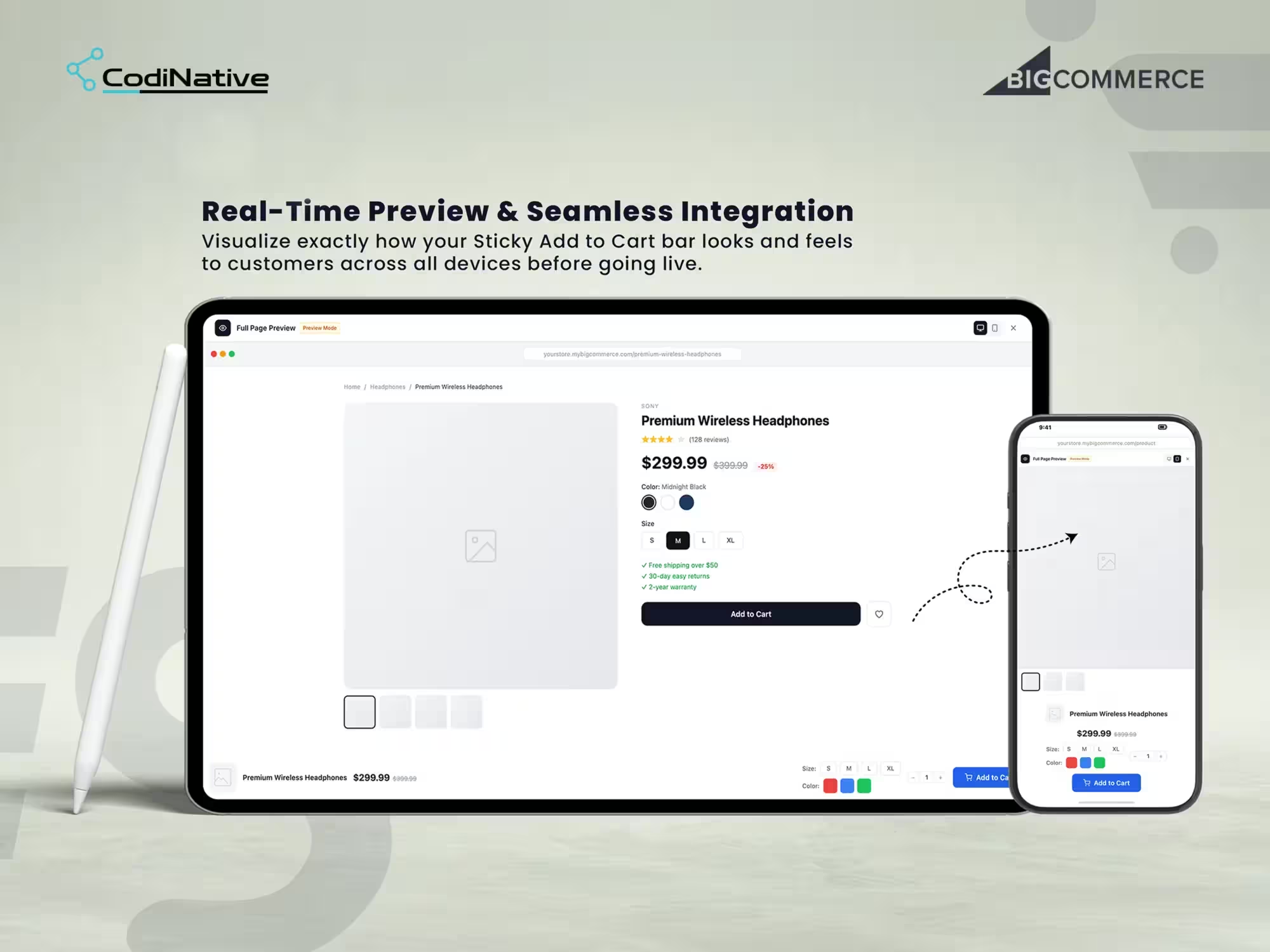
Merchants control everything from one interface: bar colors, typography, spacing, shadows, element order, scroll trigger threshold, entry and exit animations, and bar position on the viewport. A real-time live preview renders every change instantly across desktop and mobile before anything goes live. No Stencil template edits. No theme files touched. No developer involvement after install.
Sticky Add-to-Cart App Development: Situation, Task, Action, Result
The Situation: No Native Way to Keep the Add to Cart Button Visible
The Task: Building a Flexible App With Zero Developer Involvement After Install
The Action: Three Control Panels, Live Preview, Scripts API Deployment
The Result: A No-Code Conversion Tool for Any BigCommerce Stencil Theme
- Approval Workflow
- Branded Emails
- REST API v3
- OAuth 2.0
- Webhooks
Core Features of the Sticky Add-to-Cart App
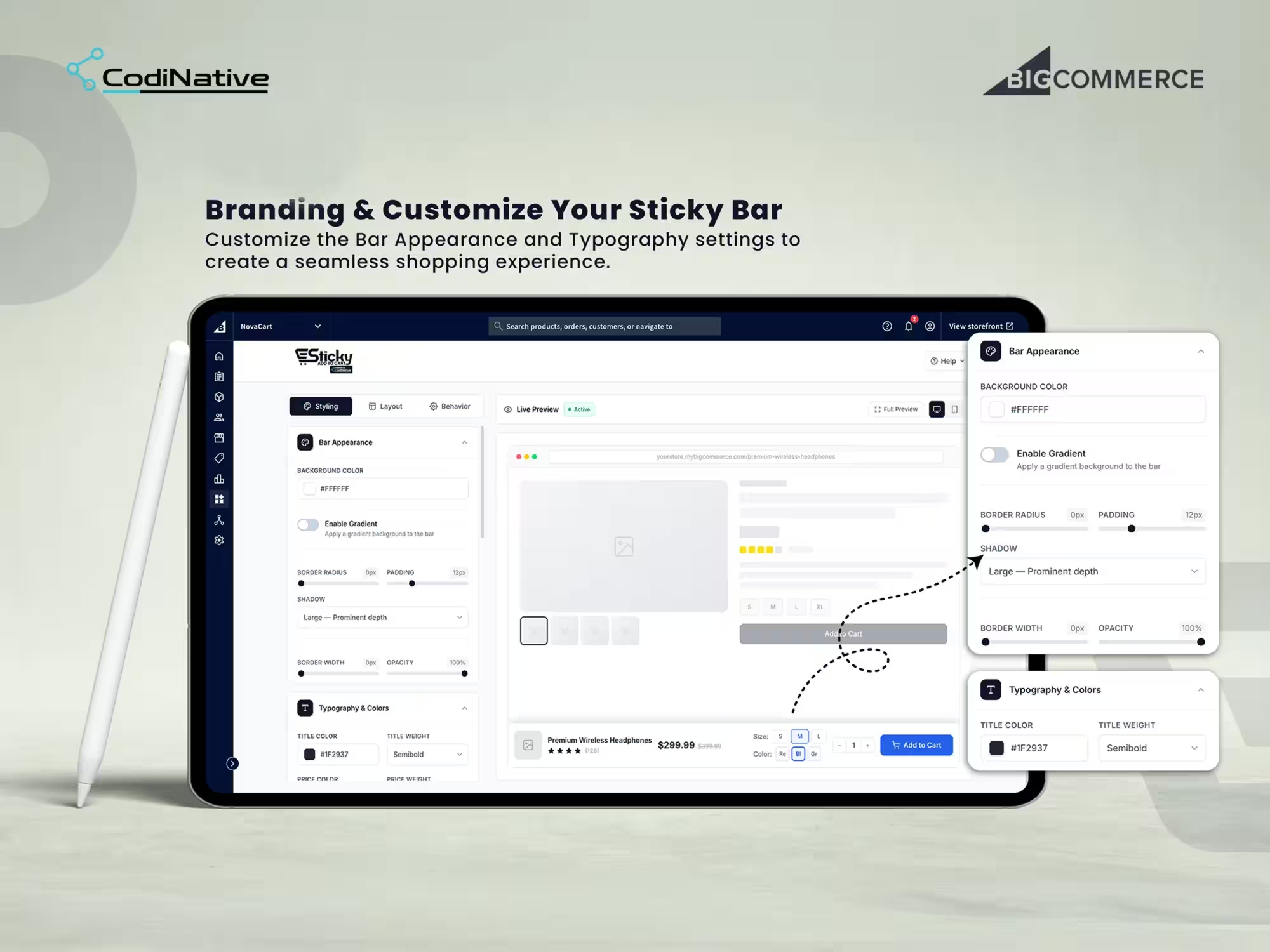
Styling Panel: Bar Appearance & Typography
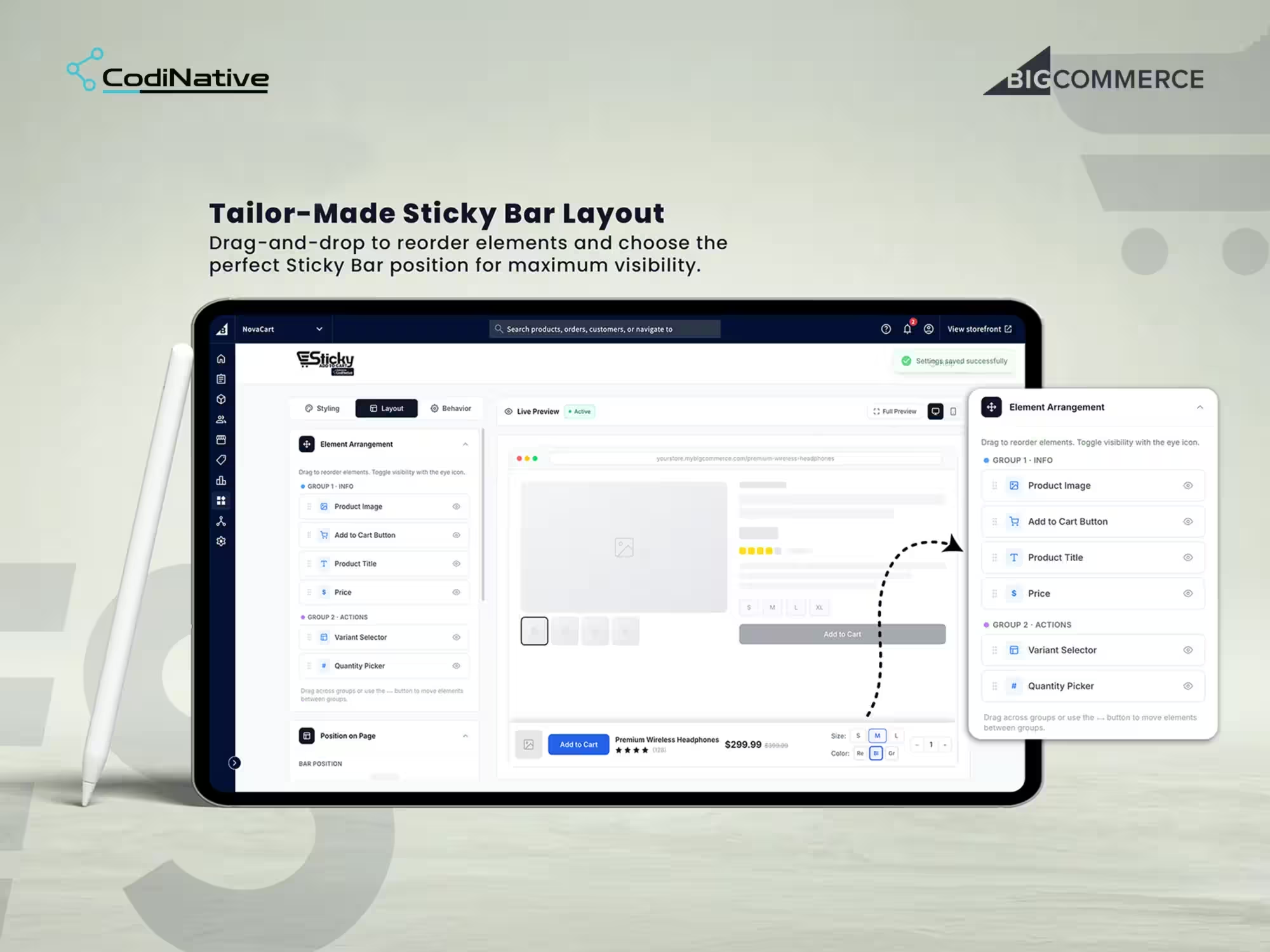
Layout Panel: Drag-and-Drop Element Arrangement
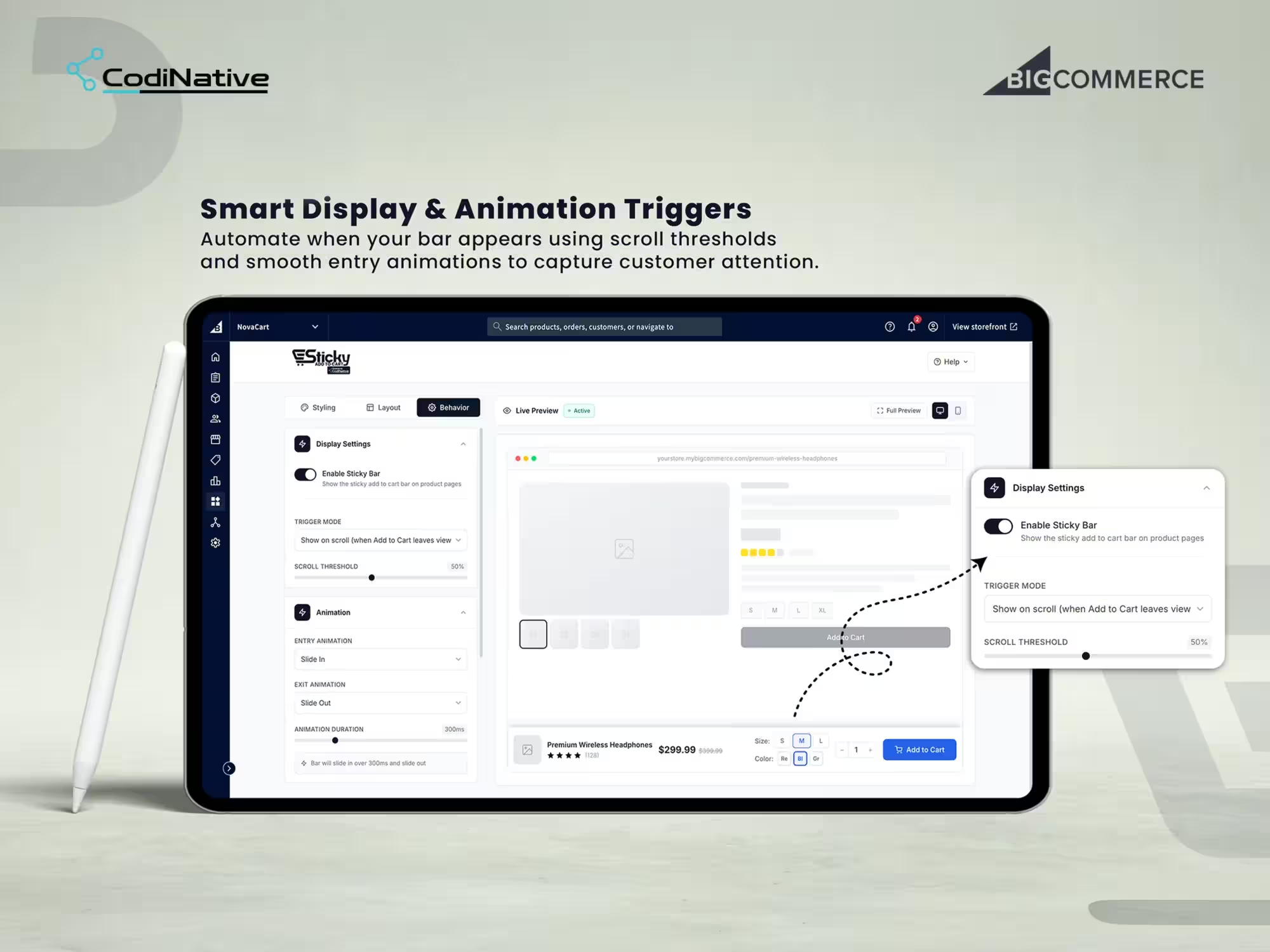
Behavior Panel: Scroll Triggers & Animations
Real-Time Preview: Desktop & Mobile
Sticky Add-to-Cart App: What Was Shipped
BigCommerce app with OAuth 2.0 install flow and native control panel integration
Styling panel bar appearance: background color, gradient, border radius, padding, shadow, border width, opacity
Typography & Colors title, price, and button text styling without CSS
Drag-and-drop layout builder element arrangement across Info and Actions groups with per-element visibility toggles
Bar position control top or bottom viewport placement
Behavior panel trigger mode, scroll threshold slider, entry animation, exit animation, animation duration
Plain-language behavior summary so merchants always understand the active configuration
Real-time live preview pane with Desktop and Mobile viewport toggle
Full-page isolated preview mode for end-to-end scroll behavior testing before going live
Scripts API injection scoped to product pages only zero Stencil theme modification
Automatic script cleanup on uninstall storefront returns to original state
Sticky Add-to-Cart App FAQ's
What is a sticky add-to-cart bar for BigCommerce?
A sticky add-to-cart bar is a fixed UI element that stays visible at the top or bottom of the product page viewport as customers scroll. It displays the product title, price, variant selectors, quantity picker, and Add to Cart button so the purchase action is always accessible regardless of scroll position. On BigCommerce, implementing this without an app requires custom Stencil development that breaks on theme updates. This app injects through the Scripts API and is entirely theme-agnostic.
Does the app modify BigCommerce Stencil theme files?
No. The app deploys entirely through the BigCommerce Scripts API. No Stencil templates, no templates/components, no assets/js files are modified at any point. The bar loads as a managed script on product pages only. Theme updates, theme switches, and theme rollbacks have no effect on the app. Uninstalling removes the script automatically and the storefront returns to its original state with nothing left behind.
What OAuth scopes does the app request at install?
Two scopes only: store_themes_manage to inject the sticky bar script through the Scripts API, and store_v2_information_read_only for store context including currency and locale. No customer, order, payment, catalog write, or financial data scopes are requested at any point.
Does the sticky bar work on all BigCommerce Stencil themes?
Yes. Because the app injects through the Scripts API rather than modifying Stencil templates, it works on Cornerstone and any custom Stencil theme without per-theme configuration or a pre-deployment theme audit.
Can merchants control exactly when the sticky bar appears?
Yes. The Behavior panel has a Trigger Mode dropdown and a Scroll Threshold slider. The default trigger is Show on scroll when the original Add to Cart button leaves the viewport the bar appears exactly when the native button is no longer visible and disappears when the customer scrolls back up so the two never compete. The scroll threshold is adjustable for stores where the default trigger point needs fine-tuning.
Does the sticky bar support variant selection and quantity input?
Yes. Variant Selector and Quantity Picker are available elements in the Layout panel's Actions group. Merchants show or hide them independently and reorder them relative to other bar elements using drag-and-drop. The variant selector in the bar is fully functional customers select size, color, or other variants directly in the sticky bar without scrolling back up to the native selector.
Does the app work on mobile as well as desktop?
Yes. The bar is fully responsive and renders correctly across desktop, tablet, and mobile viewports. The admin includes a Mobile viewport toggle in the live preview so merchants verify the bar renders and behaves correctly on smaller screens before activating on the live store.
How long does it take Codinative to build a custom BigCommerce app like this?
An app of this scope real-time customization UI with three control panels, Scripts API injection, live preview with mobile toggle, drag-and-drop layout builder, and scroll behavior controls takes Codinative six to ten weeks from discovery to BigCommerce App Marketplace submission, covering OAuth setup, Scripts API integration, admin UI build, cross-device QA, and the BigCommerce security review.
Is there a setup guide for the sticky add-to-cart bar?
Yes. The Sticky Add to Cart user guide covers installing the app and configuring the trigger, styling and placement options.
- Verified BigCommerce Partner