
- BigCommerce / Store Redesign / Premium Apparel
Tellason: BigCommerce Store Redesign & Premium Apparel Experience
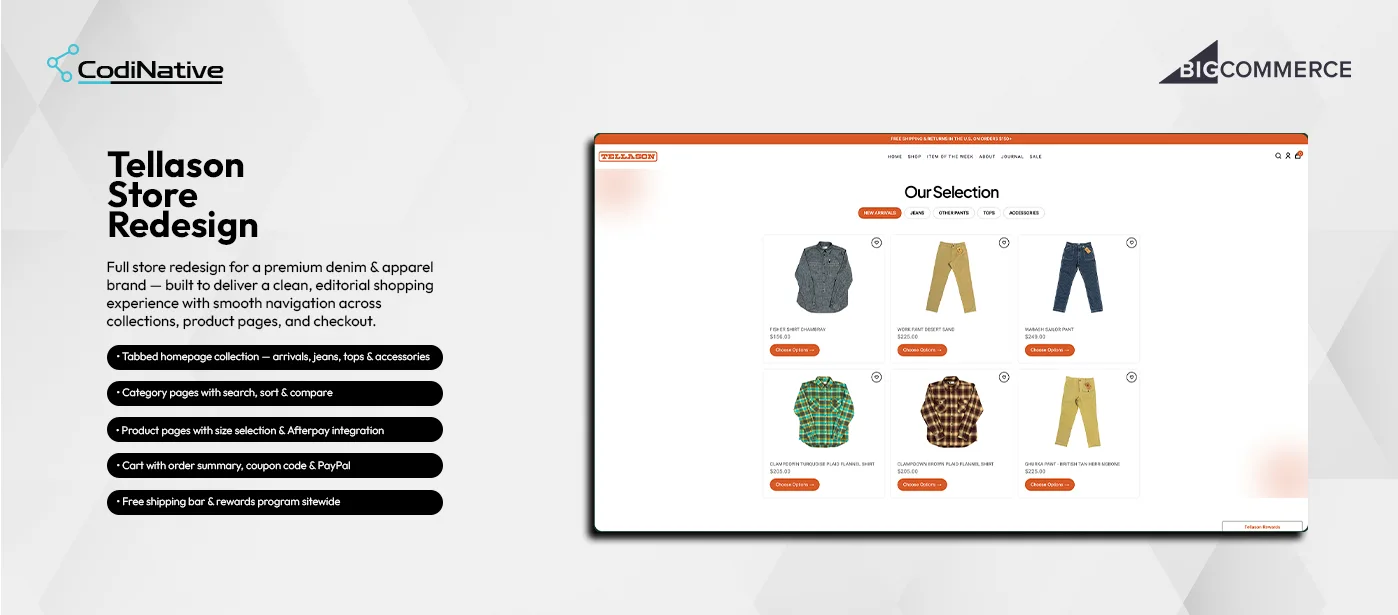
- before
The Problem: A Storefront That Didn't Match a Premium Denim Brand
Tellason makes premium denim and workwear — garment-dyed Italian-fabric trousers, heavyweight flannel shirts, selvedge jeans built for years of wear. The store did not reflect any of that. The homepage had no organised product discovery. Customers landing on the site could not instantly browse by collection type. Category pages lacked search and compare tools. Product pages had no clear purchase flow — no prominent size selector, no Afterpay messaging and no visual hierarchy guiding customers to Add to Cart. The cart and checkout felt generic, with no brand continuity from product page to order confirmation.
- After
The Solution: A Full Editorial Redesign Across Every Page Template
Codinative redesigned every page of the Tellason BigCommerce store with a clean editorial aesthetic — high whitespace, bold uppercase typography and the brand’s orange as the single accent colour throughout. A tabbed collection grid on the homepage lets visitors switch between New Arrivals, Jeans, Other Pants, Tops and Accessories instantly. Category pages gained full-width search, Sort By and per-product comparison. Product pages display a vertical thumbnail gallery, size selector, quantity picker, Afterpay instalment calculation and a clear Add to Cart CTA. Cart and checkout were rebuilt with structured order summaries, coupon input, PayPal and multi-step accordion checkout.
Tellason Store Redesign Development: Situation, Task, Action, Result
The Situation: No Discovery Structure, Purchase Hierarchy, or Brand Continuity
The Task: Redesigning Homepage, Category, Product, Cart and Checkout
The Action: A Custom Editorial Stencil Theme Across Five Templates
The Result: A Store That Matches the Quality of the Garments It Sells
- Approval Workflow
- Branded Emails
- REST API v3
- OAuth 2.0
- Webhooks
Core Features: Five Page Templates, One Premium Denim Store
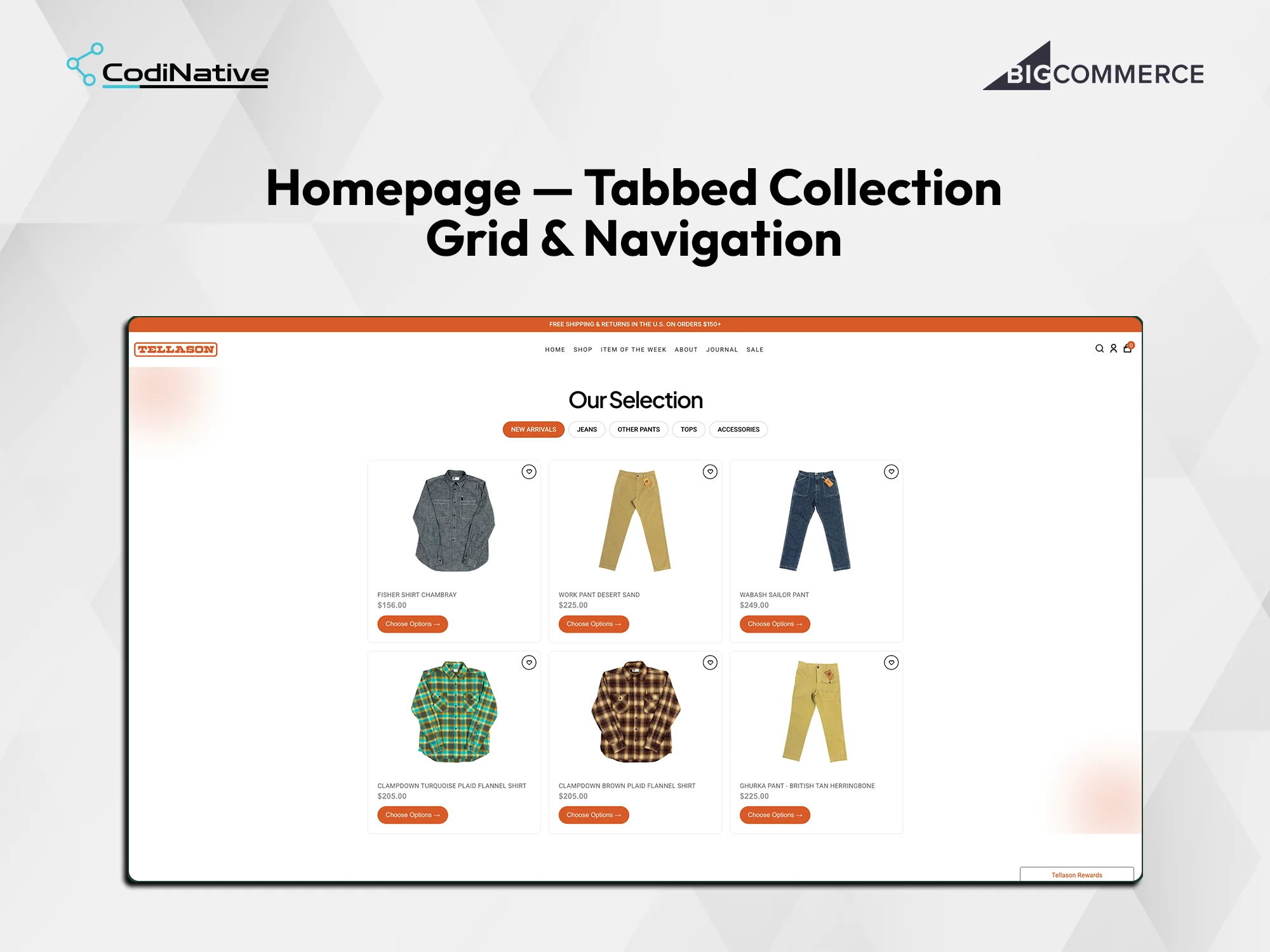
Homepage: Tabbed Collection Grid and Navigation
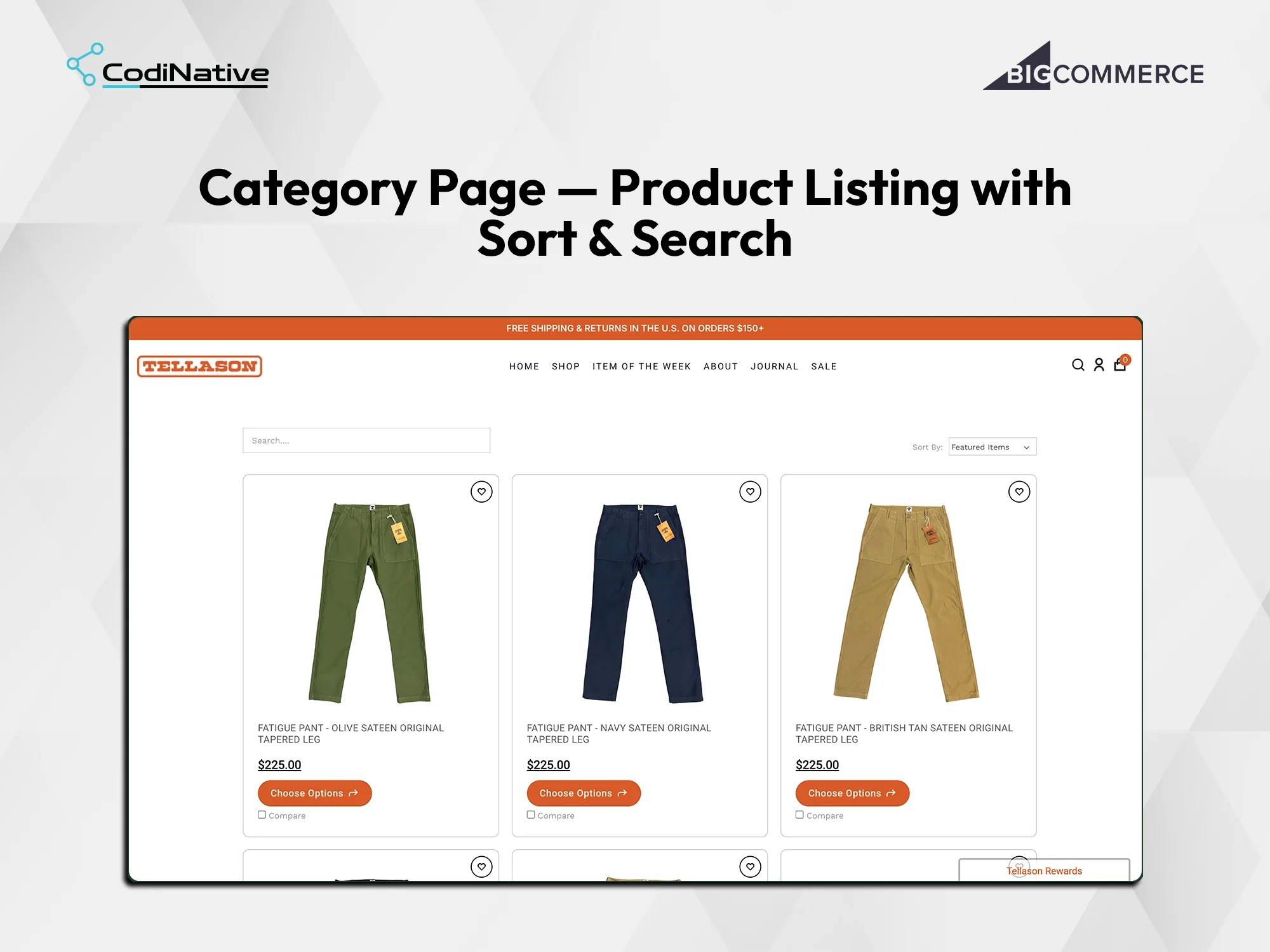
Category Page: Product Listing with Sort and Search
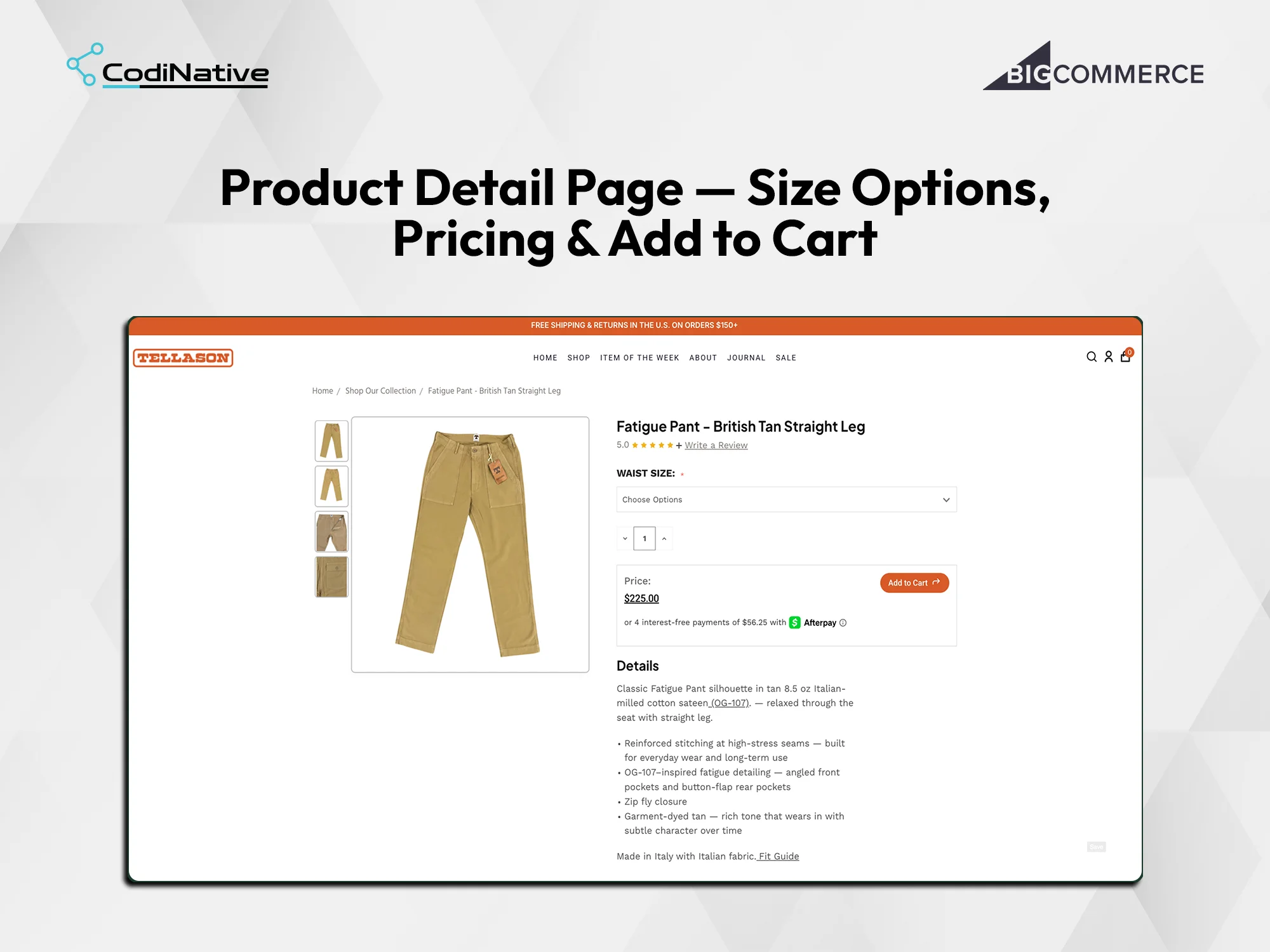
Product Detail Page: Size Options, Pricing and Add to Cart
Cart Page: Order Summary and Multi-Payment Checkout
Tellason Store Redesign: What Was Shipped
Custom BigCommerce Stencil theme with high whitespace editorial design and orange accent sitewide
Free shipping promotional bar — "Free Shipping and Returns in the U.S. on Orders $150 plus" — sitewide
Tabbed homepage collection — New Arrivals, Jeans, Other Pants, Tops, Accessories — with vanilla JavaScript tab switching
Three-column homepage product grid with product image, name, price and Choose Options CTA
Category pages with full-width search input, Sort By dropdown and wishlist heart per card
Compare checkbox on every category product card for side-by-side product comparison
Product pages with vertical thumbnail strip, large primary image and vanilla JavaScript image swap on thumbnail click
Waist Size required dropdown selector, quantity picker and Price plus Add to Cart panel on product pages
Afterpay instalment messaging — 4 interest-free payments calculated from live product price
Cart page with order summary, shipping input, coupon code field, Grand Total and Check Out CTA
PayPal and Pay Later as alternative payment options on the cart page and inside checkout
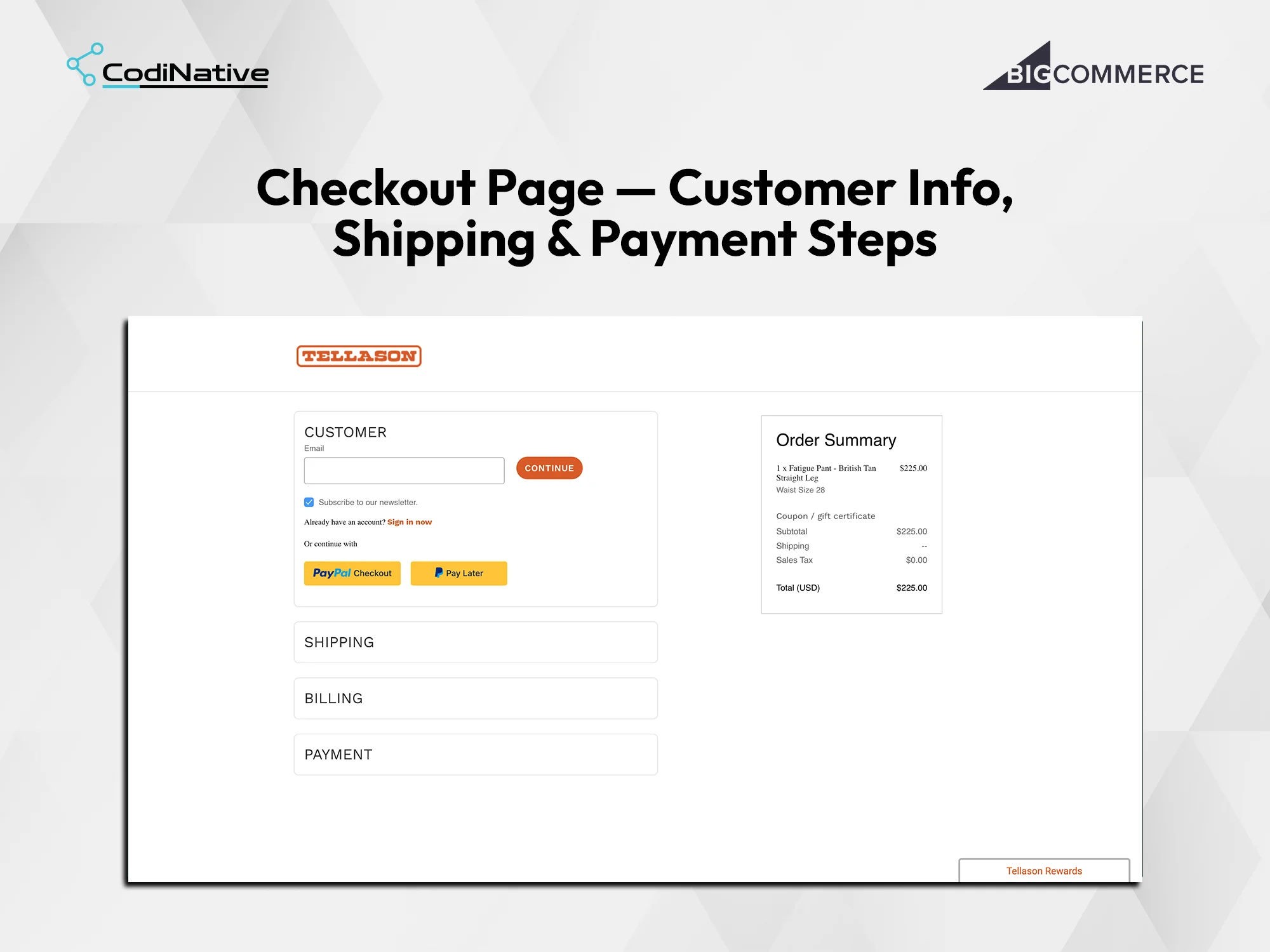
Multi-step accordion checkout with Customer, Shipping, Billing and Payment steps and persistent order summary
Tellason Store Redesign FAQ's
What is a tabbed homepage collection grid on BigCommerce?
A tabbed homepage collection grid on BigCommerce is a custom Stencil section that displays product categories as tab buttons — New Arrivals, Jeans, Other Pants, Tops, Accessories — above a product grid. Clicking a tab swaps the product cards in the grid using vanilla JavaScript without a page reload. Each product card shows the product image, name, price and a Choose Options CTA. It gives homepage visitors immediate access to every collection without navigating away from the landing page.
How does Afterpay integration work on a BigCommerce product page?
Afterpay on a BigCommerce product page displays an instalment message below the product price — for example, 4 interest-free payments of $56.25 with the Afterpay logo and an information icon. BigCommerce has native Afterpay support through its payment provider integrations. The messaging renders via a Stencil product template partial that checks for Afterpay availability and outputs the instalment amount calculated from the product price.
How is the checkout page customised on BigCommerce?
BigCommerce checkout customisation is done through the Checkout SDK or by styling the native optimised one-page checkout. The Tellason checkout shows Customer, Shipping, Billing and Payment as collapsible accordion steps. The right column shows an Order Summary with itemised product, variant, subtotal, shipping, sales tax and total. PayPal Checkout and Pay Later buttons appear as alternative payment methods inside the Customer step.
How is the BigCommerce category page built for a premium apparel store?
+ A BigCommerce category page for a premium apparel brand uses a custom Stencil category template with a full-width search input above the product grid, a Sort By Featured Items dropdown on the right and three-column product cards. Each card shows the product image on white, product name in uppercase, price, a Choose Options CTA and a Compare checkbox. A wishlist heart icon sits in the top right corner of each card.
What is included in a BigCommerce cart page for a premium fashion store?
The Tellason BigCommerce cart page shows a Shopping Cart heading with item count, a product row with thumbnail image, product name in uppercase, price, size variant, a quantity selector with minus and plus controls and a remove button. The Order Summary panel on the right shows product price, shipping Add Info link, Coupon Code field, Grand Total and a prominent Check Out button. PayPal and Pay Later appear below the order summary as alternative payment options.
How long does Codinative take to redesign a full BigCommerce apparel store?
A full BigCommerce apparel store redesign covering a tabbed homepage collection, category pages with search and sort, product pages with size selector and Afterpay, cart with PayPal and multi-step checkout takes Codinative six to ten weeks from discovery to live deployment, including responsive QA across devices and browser testing.
- Verified BigCommerce Partner