Front Row Furniture BigCommerce Advanced Category Filter System
Type

BigCommerce Custom Development · Category UX · Advanced Filtering

Role

BigCommerce Stencil · JavaScript · Custom CSS · Catalog API

Stack

BigCommerce Stencil · JavaScript · Custom CSS · Catalog API

Status

01

The Problem

BigCommerce ships every merchant the same registration form. It collects a name, an email, and a password, and it creates an account on the spot  no review, no qualification, no custom data.

That works for a standard retail store. It breaks immediately for merchants running wholesale programs, trade pricing, B2B onboarding, or members-only access. They need to know who is signing up before granting access. They need custom fields  company name, trade pricing eligibility, purchase intent, tax ID. They need an approval step that sits between the application and the account.

Without a solution built for BigCommerce, merchants were stitching together generic form plugins with no real platform integration, creating customers manually inside the admin, and managing approvals through email threads. Submission data lived in spreadsheets. Nothing connected back to the customer record in BigCommerce. The process was slow, inconsistent, and entirely dependent on someone remembering to follow up.

02

The Solution

Codinative built a custom BigCommerce app that replaces the default registration flow with a controlled, branded, fully automated onboarding pipeline.

It installs natively into the merchant’s BigCommerce control panel through the App Development Framework, authenticated via OAuth 2.0. Customer creation on approval goes through the REST API v3. The active form injects into the storefront through the Scripts API. Every state change fires through Webhooks that trigger the correct branded email the moment a decision is made.

Merchants build forms visually without writing code. Every submission enters an approval queue. Approvals create a real customer in BigCommerce with all submitted data attached. Rejections and resubmission requests send the right branded email automatically. The entire pipeline lives in one dashboard inside the control panel. No spreadsheets. No manual emails. No developer needed after install.

Project Framework

Situation · Task · Action · Result

S Situation

Front Row Furniture had a large events furniture catalogue but limited BigCommerce native filtering. Buyers could not narrow by material, finish, condition, or merchandising flags making product discovery slow and friction-heavy.

T Task

Build a custom multi-attribute filtering system that lets buyers refine by any combination of material, price, rating, colour, finish, condition, featured status, and stock status with real-time updates and clean active filter states

A Action

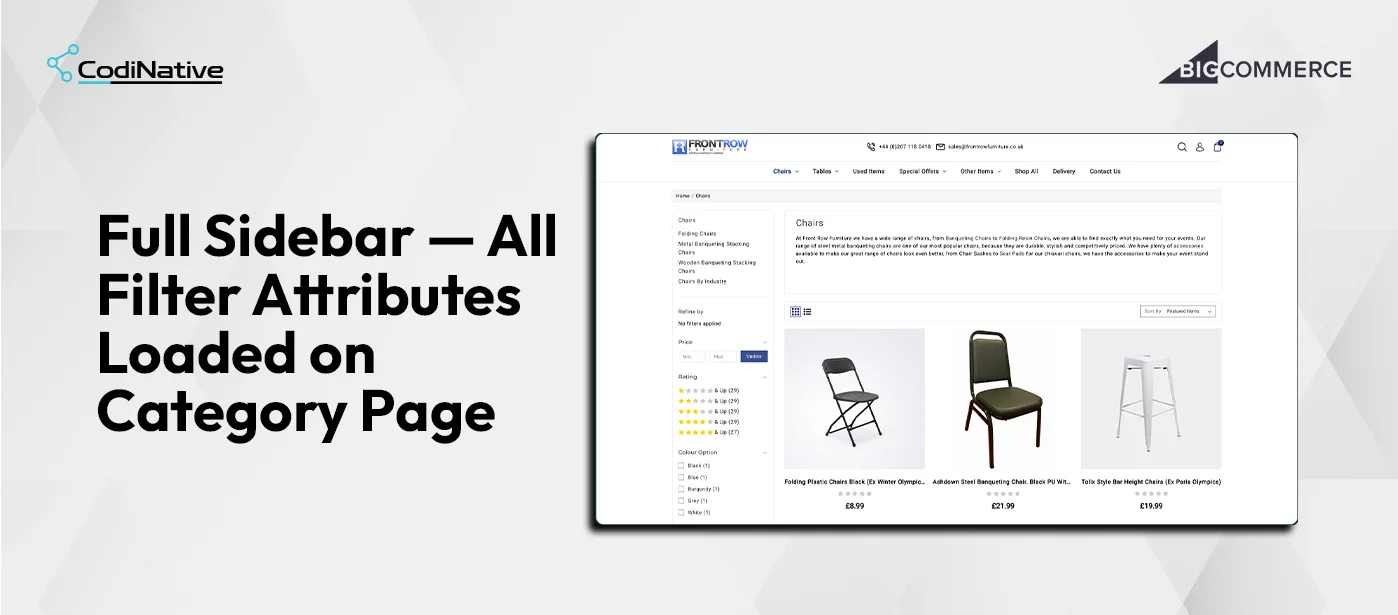
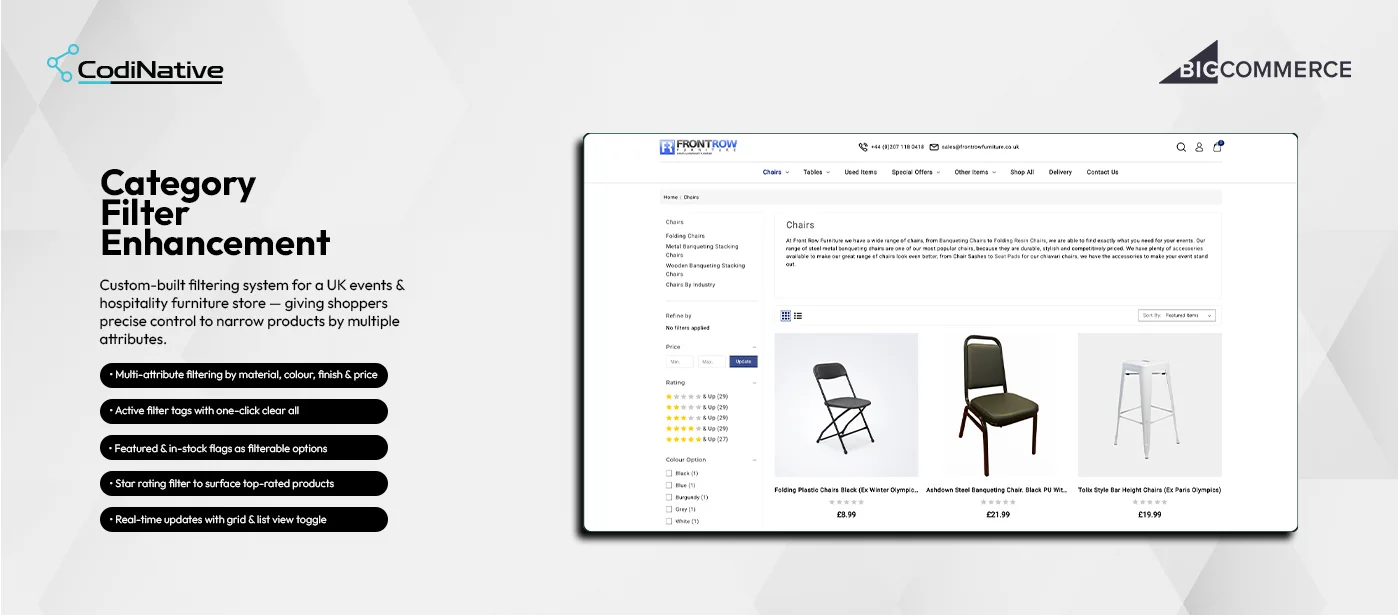
Built a custom sidebar filter panel on BigCommerce Stencil with checkbox filters for Material (Plastic, Steel), Colour Option (Black, Blue, Burgundy, Grey, White), Finish (Dark Oak, Light Oak, Walnut), Condition (Used), and Other flags (Is Featured, In Stock, Has Free Shipping). Added a star rating threshold filter with five levels and product counts per level. Added a price range filter with Min/Max inputs. Implemented active filter tags with individual dismiss and a Clear all link. Connected all filters to BigCommerce custom fields via client-side JavaScript with real-time DOM updates and URL query parameter sync. Added grid and list view toggle persisting across filter changes.

R Result

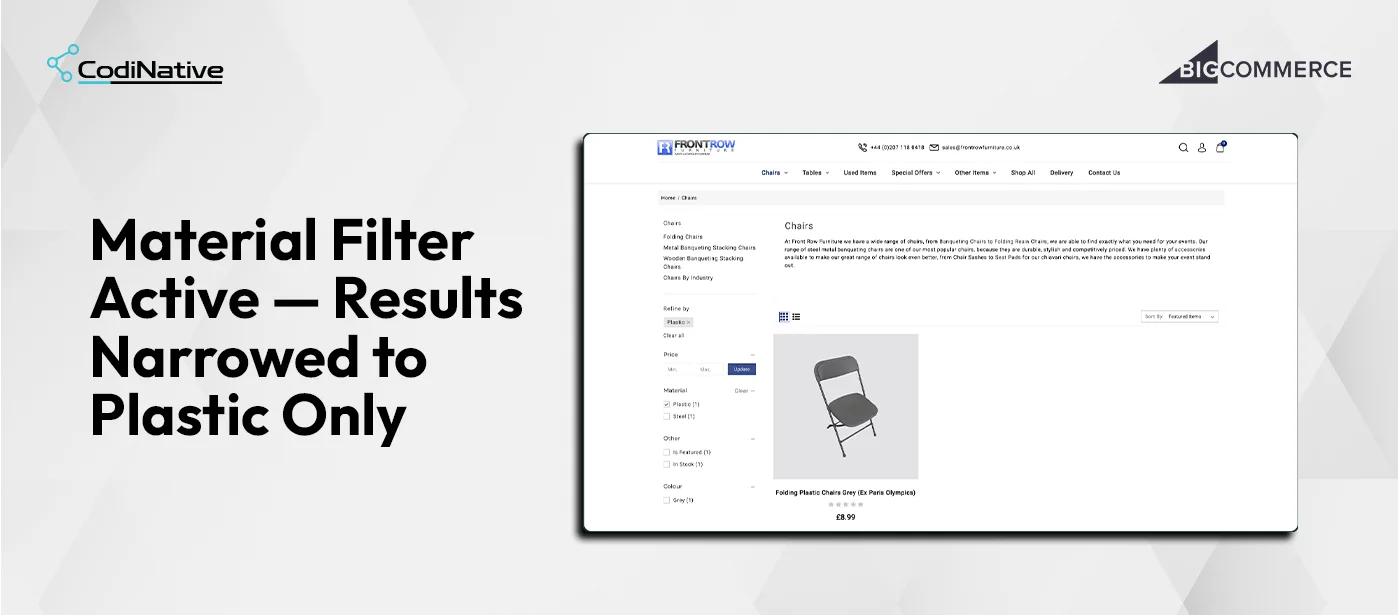
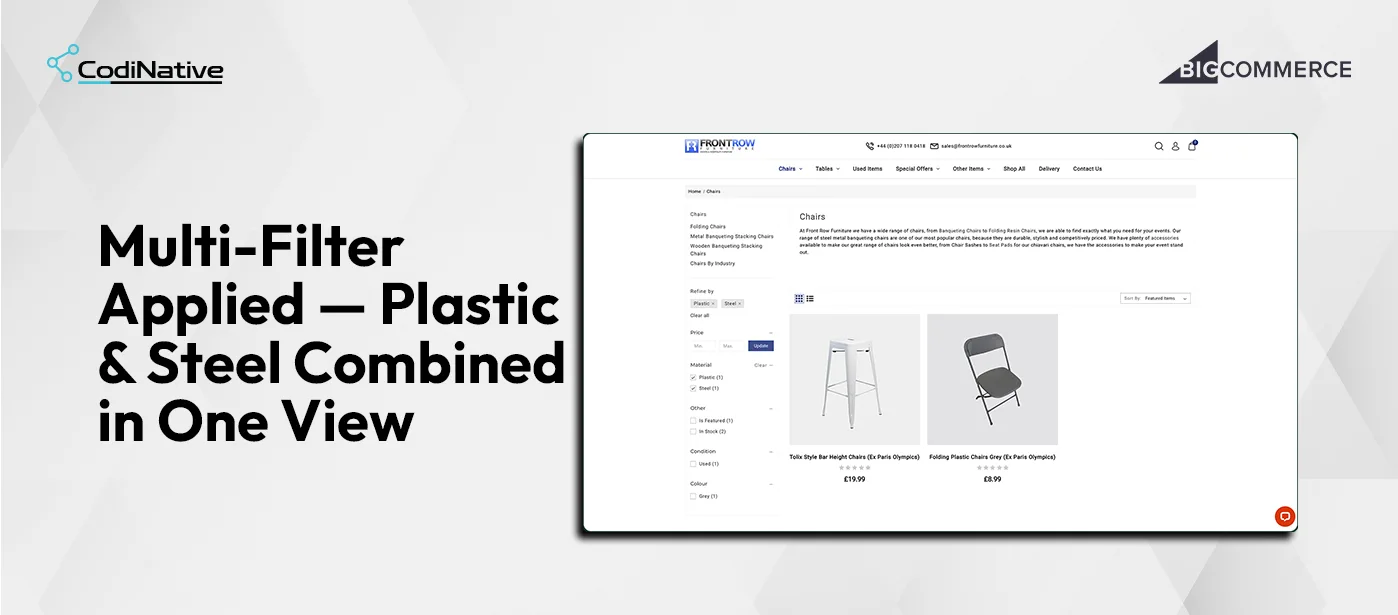
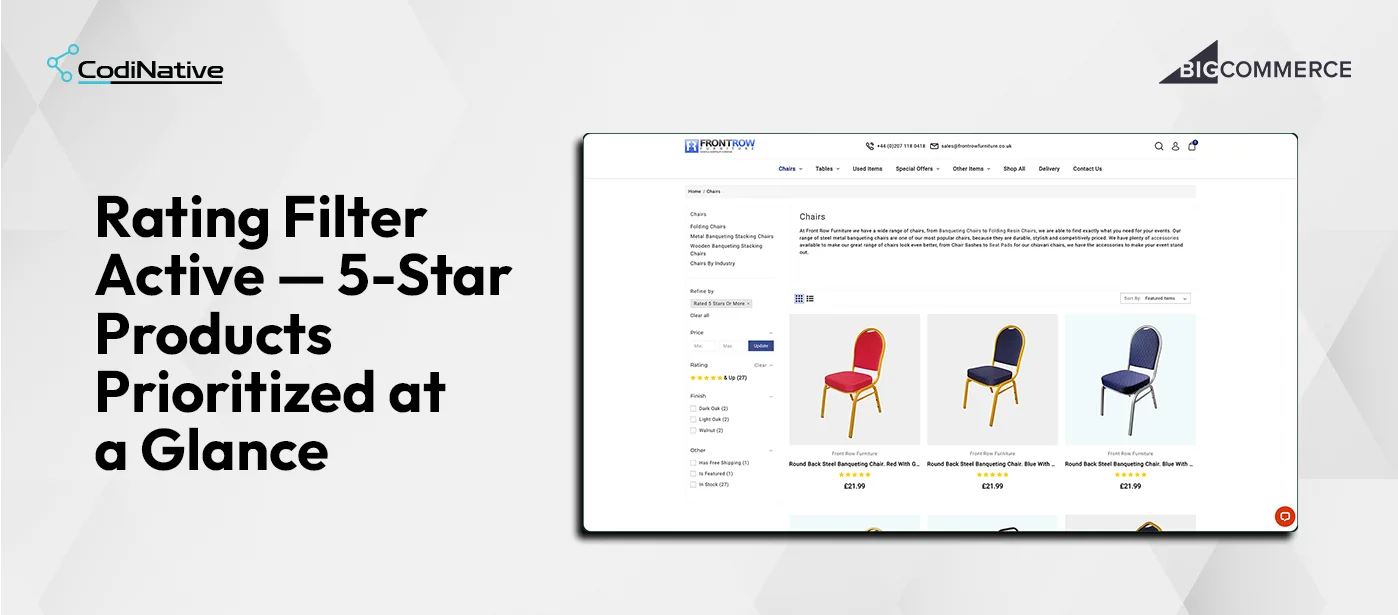
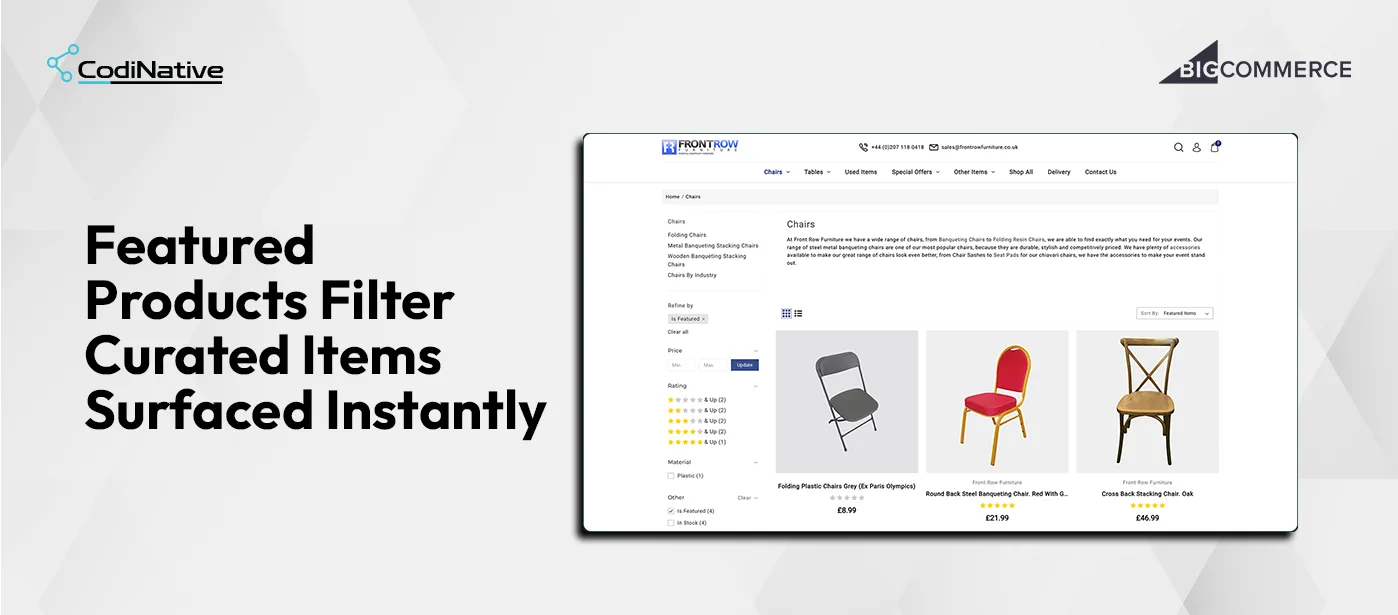
Material: Plastic alone returns one result Folding Plastic Chairs Grey at £8.99. Plastic and Steel combined returns two Tolix Style Bar Height Chairs at £19.99 and Folding Plastic Chairs Grey at £8.99. Is Featured returns four curated products instantly. Rated 5 Stars or More returns 27 products. Buyers go from full catalogue to a purchase-ready shortlist in one or two filter selections.

Core Features

01

Feature 01

Feature 01 Sidebar Filter Panel

The sidebar loads all available filter dimensions for the current category on page load. Each section collapses independently. Product count per filter value is shown inline Black (1), Blue (1), Burgundy (1), Grey (1), White (1) so buyers know before selecting whether a filter returns results. Filter values with zero matching products in the current category do not render, preventing dead-end filter combinations.

Feature 02

Feature 02 Active Filter Tags and Clear State

Every applied filter appears as a tag in the Refine by bar “Plastic ×”, “Is Featured ×”, “Rated 5 Stars or More ×”. Each tag has an × button removing that single filter. A Clear all link removes every active filter in one click. Each filter section also has its own Clear → link to remove one dimension without touching others. All state is managed client-side in JavaScript with no page reload.

02

03

Feature 03

Feature 03 Multi-Select and Cross-Attribute Filtering

Within a single dimension Material multiple selections use OR logic: Plastic and Steel returns products matching either. Across dimensions Material and Rating selections use AND logic: only products matching both criteria appear. This matches how buyers think when narrowing a furniture catalogue by multiple requirements simultaneously.

Feature 04

Feature 04 Rating Threshold Filter

Five threshold levels from 1 star and up through 5 stars and up with product counts per level. Selecting 5 stars and up 27 products returns only the Round Back Steel Banqueting Chairs at £21.99 and all other five-star products. The filter compares each product’s average review rating against the selected minimum rather than using BigCommerce’s native sort.

04

05

Feature 05

Feature 05 Featured, In Stock, and Free Shipping Flags

Is Featured maps to the is_featured boolean on each product via the BigCommerce Catalog API. In Stock maps to inventory availability. Has Free Shipping maps to the product’s free shipping flag. Checking Is Featured instantly returns the four products Front Row Furniture has manually curated including Cross Back Stacking Chair Oak at £46.99 without the buyer needing to know which products are featured. All product data loads once at category page load and filters client-side with no additional API calls per filter action.

01

Feature 01

Visual Form Builder

The builder splits into a field palette and a real-time live preview. Drag a field in, the preview updates immediately. Thirteen field types across four groups.

Basic Inputs — Text · Email · Phone · Number
Selection Fields — Textarea · Select · Radio · Checkbox
Address Fields — Country · State/Province
Special Fields — Date · File · URL

A theme editor handles form colors, typography, and button styles — no CSS needed. First Name, Last Name, Email, and Password are locked because BigCommerce requires them to create a customer through the REST API v3. Desktop and Mobile viewport toggles let merchants verify the form renders correctly before it goes live.

Core Features

Architecture

Registered through the BigCommerce App Development Framework. OAuth 2.0 handles authentication through a standard handshake identical to every app in the BigCommerce App Marketplace. Customer creation uses the REST API v3 Customers endpoint. The active form injects into the storefront through the Scripts API. Submission and approval events fire through Webhooks that trigger email dispatch the moment a status changes. The dashboard runs on BigDesign tokens for native control panel styling with custom React components for the form builder and preview.

Layer Technology
App Framework
App Framework
Authentication
OAuth 2.0
Customer Creation
BigCommerce REST API v3
Storefront Injection
Scripts API
Event Layer
Webhooks
Admin UI
BigDesign + React
Backend
Node.js
Database
PostgreSQL
Email
Transactional Email API

What Was Shipped

Deliverables

Custom sidebar filter panel Price, Rating, Colour, Material, Finish, Condition, Other flags

Custom sidebar filter panel Price, Rating, Colour, Material, Finish, Condition, Other flags

Per-filter-value product counts inline no zero-result values displayed

Per-filter-value product counts inline no zero-result values displayed

Multi-select filters with OR logic within dimension, AND logic across dimensions

Multi-select filters with OR logic within dimension, AND logic across dimensions

Active filter tags with individual dismiss and Clear all

Active filter tags with individual dismiss and Clear all

Per-section Clear link to remove one dimension without affecting others

Per-section Clear link to remove one dimension without affecting others

Rating threshold filter five levels from 1 star up to 5 stars up

Rating threshold filter five levels from 1 star up to 5 stars up

Is Featured, In Stock, Has Free Shipping as filterable flags via Catalog API

Is Featured, In Stock, Has Free Shipping as filterable flags via Catalog API

URL query parameter sync filtered views shareable and bookmarkable

URL query parameter sync filtered views shareable and bookmarkable

Grid and list view toggle persisting across filter changes

Grid and list view toggle persisting across filter changes

Real-time product grid update on every filter action no page reload

Real-time product grid update on every filter action no page reload

BigCommerce app with OAuth 2.0 install flow and native control panel integration

No-code visual form builder — 13 field types, live preview, theme editor

Multi-form library with independent configurations and one-click exclusive activation

Approval workflow engine — Pending · Approved · Rejected · Resubmission

Filterable, searchable request management queue

Applicant detail view with full submission data and instant action buttons

Five branded transactional email templates — merge variables, Custom HTML, live preview

Analytics dashboard with real-time approval rate and recent submissions

Native BigDesign UI throughout — matches BigCommerce admin exactly

Common Questions

Frequently Asked Questions

BigCommerce's native faceted search supports variant-level options and a limited set of product attributes. It does not support custom fields as filter dimensions, boolean merchandising flags like is_featured, star rating thresholds, or condition flags. For a furniture catalogue where material, finish, condition, and curation status drive the buying decision, the native system cannot surface what buyers need.

At filter panel load time, JavaScript reads the full product set for the current category and counts how many products match each custom field value. The count renders inline next to each checkbox label. Filter values with zero matching products do not appear in the sidebar, preventing buyers from selecting a filter that returns an empty page.

Within a single dimension, multiple selections use OR logic Plastic and Steel returns products matching either material. Across dimensions, selections use AND logic Material: Steel and Rating: 5 Stars and Up returns only products that are both steel and five-star rated. This matches how buyers narrow a catalogue by multiple requirements at once.

Is Featured maps to the is_featured boolean on each BigCommerce product. In Stock maps to inventory availability. Both are read at category page load from BigCommerce product data. The JavaScript filter logic checks these against the active filter state when rendering the grid. No additional API call is made per filter action.

Yes. Every filter action updates the page URL with query parameters for the active filters. A buyer who narrows to Material: Plastic and Rating: 5 Stars and Up gets a URL that can be shared or bookmarked. The filter panel reads from URL query parameters on page load and restores the active state automatically.

Yes. The filter sidebar reads available dimensions from the products in the current category. The Tables category page with different custom field values renders its own filter options automatically. The same JavaScript and CSS handles every category on the Front Row Furniture store without per-category configuration.

What is a custom signup form app for BigCommerce?

It replaces the native BigCommerce customer registration with a configurable form that routes every submission into a merchant-controlled approval workflow. The merchant collects whatever data the business needs, reviews applications from a centralized dashboard, and approves or rejects them before a customer account is created in BigCommerce through the REST API v3. It installs directly into the control panel through the App Development Framework no third-party dashboard, no separate login.

A script tag renders a form in the storefront but cannot create customers, listen to Webhooks, or build an admin UI inside the BigCommerce control panel. The App Development Framework provides OAuth 2.0 authentication and authorized REST API v3 access both required for an approval workflow that produces real customer records with full attribute data in BigCommerce. Any solution not built on the App Development Framework has no reliable path to the customer API.

Add Your Heading Text Here Add Your Heading Text Here Add Your Heading Text Here Add Your Heading Text Here Add Your Heading Text Here

Three at install. store_v2_customers to create approved customers through the REST API v3. store_themes_manage to inject the active form into the storefront via the Scripts API. store_v2_information_read_only for store context currency, locale, platform name. No payment, order, catalog, or financial data scopes are requested.

Yes. The approval workflow, custom fields for business qualification trade pricing eligibility, company type, purchase intent, order volume and the applicant detail view with instant actions make this a direct fit for wholesale gating, trade pricing programs, B2B Edition onboarding, and any merchant who needs to qualify buyers before granting account access.

Yes. Every saved form keeps its own field configuration and theme independently. Merchants build once, deactivate after the campaign, reactivate next time with one toggle. Nothing is rebuilt. Wholesale forms, seasonal forms, and standard forms all live in the same library and switch in a single click.

Yes. Codinative builds both App Marketplace apps and private single-client apps. A private app installs into one store only, carries the merchant's branding throughout, and bypasses the marketplace review timeline. It is the right choice when the app handles logic specific to one merchant's operation.

Six to ten weeks from discovery to App Marketplace submission. That covers OAuth setup, REST API v3 integration, dashboard UI, cross-device QA, and the BigCommerce security review. Private apps without the marketplace review run slightly faster.

Scroll to Top