Sticky Add to Cart Bar  BigCommerce App Development

Type

BigCommerce App Development · Conversion Rate Optimization · UI/UX Design

Role

BigCommerce App Dev Framework · Scripts API · OAuth 2.0 · BigDesign · React · Node.js

Stack

BigCommerce App Dev Framework · Scripts API · OAuth 2.0 · BigDesign · React · Node.js

01

The Problem

BigCommerce ships every merchant the same registration form. It collects a name, an email, and a password, and it creates an account on the spot  no review, no qualification, no custom data.

That works for a standard retail store. It breaks immediately for merchants running wholesale programs, trade pricing, B2B onboarding, or members-only access. They need to know who is signing up before granting access. They need custom fields  company name, trade pricing eligibility, purchase intent, tax ID. They need an approval step that sits between the application and the account.

Without a solution built for BigCommerce, merchants were stitching together generic form plugins with no real platform integration, creating customers manually inside the admin, and managing approvals through email threads. Submission data lived in spreadsheets. Nothing connected back to the customer record in BigCommerce. The process was slow, inconsistent, and entirely dependent on someone remembering to follow up.

02

The Solution

Codinative built a custom BigCommerce app that replaces the default registration flow with a controlled, branded, fully automated onboarding pipeline.

It installs natively into the merchant’s BigCommerce control panel through the App Development Framework, authenticated via OAuth 2.0. Customer creation on approval goes through the REST API v3. The active form injects into the storefront through the Scripts API. Every state change fires through Webhooks that trigger the correct branded email the moment a decision is made.

Merchants build forms visually without writing code. Every submission enters an approval queue. Approvals create a real customer in BigCommerce with all submitted data attached. Rejections and resubmission requests send the right branded email automatically. The entire pipeline lives in one dashboard inside the control panel. No spreadsheets. No manual emails. No developer needed after install.

Project Framework

Situation · Task · Action · Result

S Situation

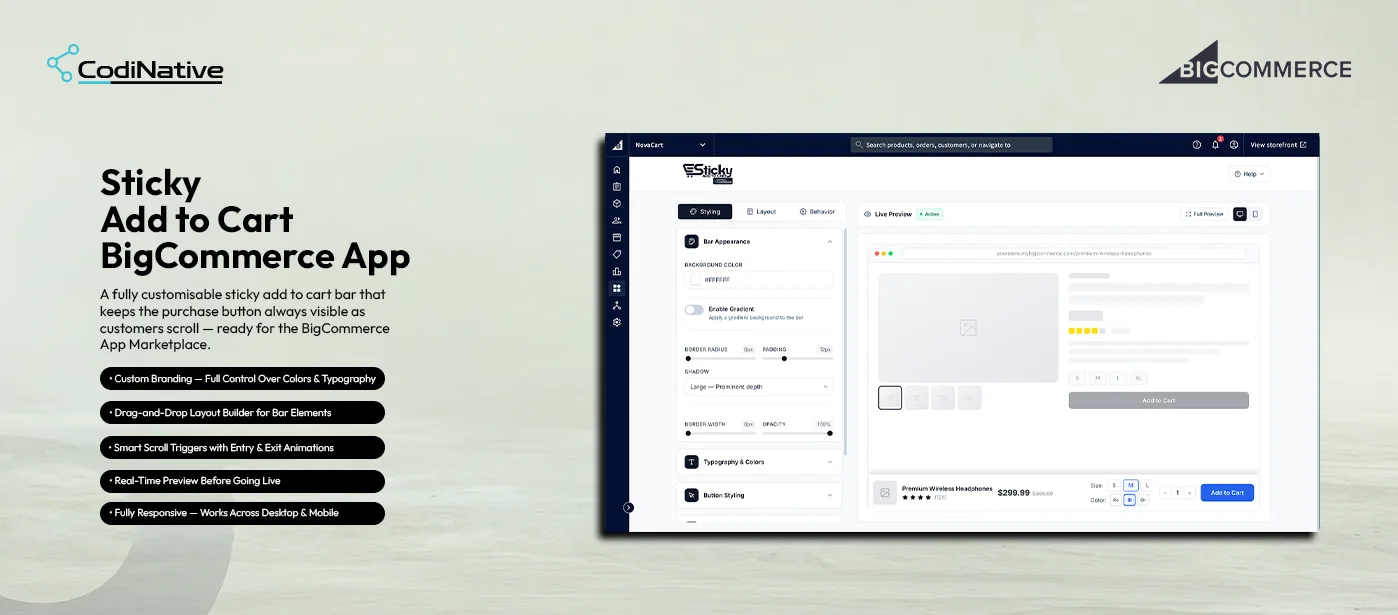
BigCommerce stores lose potential sales because the Add to Cart button disappears as customers scroll through product details. On long product pages this creates buying friction and increases drop-offs at the exact moment purchase intent is highest.

T Task

Build a flexible BigCommerce app that keeps the purchase action permanently visible while giving merchants full control over how the sticky bar looks, behaves, and integrates with their product pages without requiring Stencil edits or developer involvement after install.

A Action

Designed and built a complete customization interface with three control panels Styling for bar appearance and typography, Layout for drag-and-drop element arrangement, and Behavior for scroll triggers and animations. Built real-time live preview that renders changes instantly across desktop and mobile viewports. Deployed the bar through the Scripts API so no Stencil theme files are ever modified.

R Result

The sticky bar keeps the purchase action visible at all times across every product page, removing scroll-back friction and increasing conversion opportunities. Merchants deploy and fully customize the bar without writing a single line of code a scalable conversion optimization tool that works on any BigCommerce Stencil theme without per-theme configuration.

Core Features

01

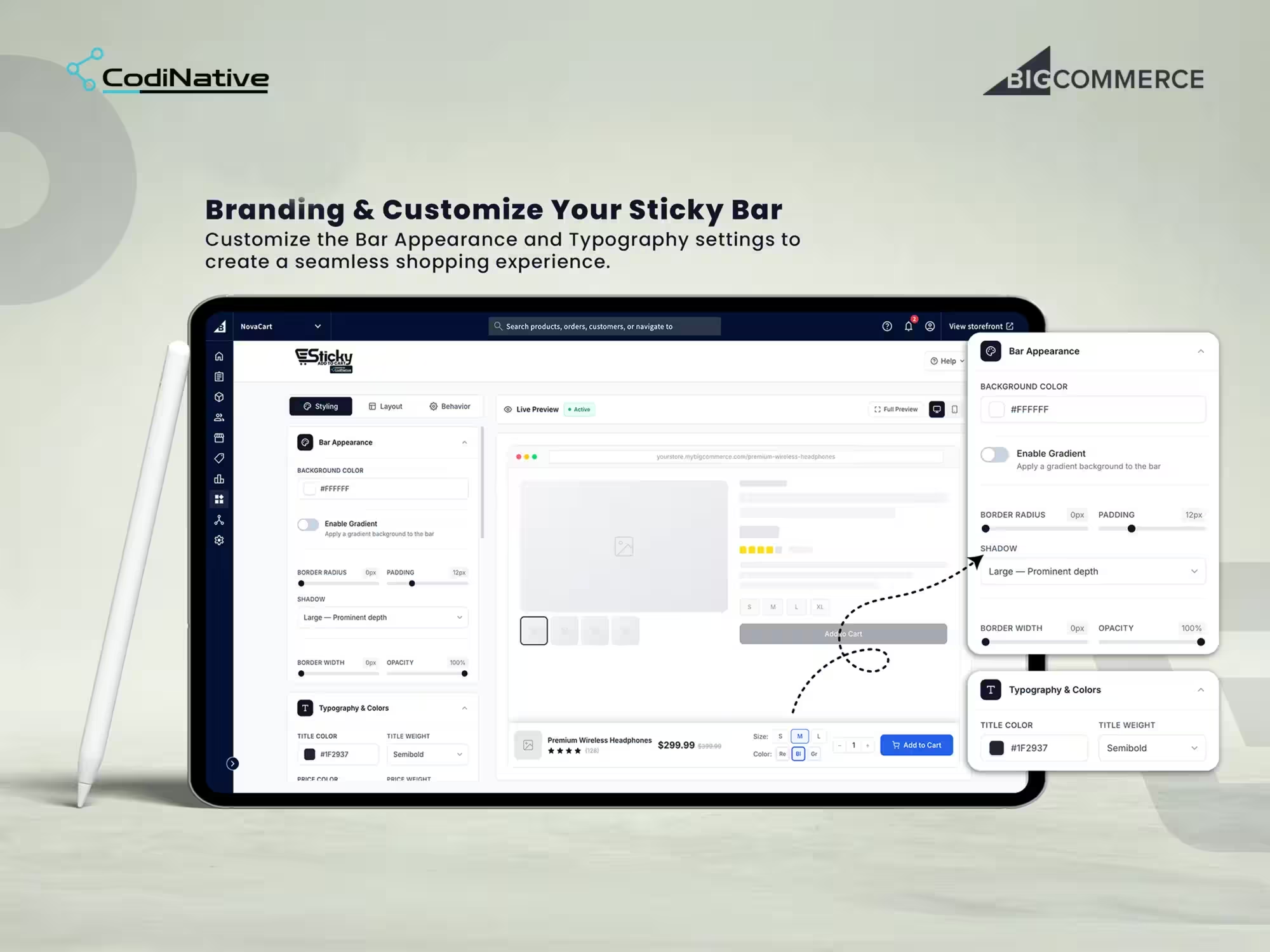
Styling Panel: Bar Appearance & Typography

The Styling tab is the first thing a merchant configures. Bar Appearance controls cover background color, gradient toggle, border radius, padding, shadow depth four shadow options from subtle to prominent border width, and opacity. Every control has a slider or color picker. Every change renders in the live preview pane to the right before a single setting is saved. Typography & Colors sits below Bar Appearance in the same tab. Merchants set title color and font weight, price color and weight, and button text styling independently so the sticky bar matches the store’s existing brand system without touching a CSS file. Logical defaults ship with the app so the bar looks professional immediately after install, and every default is overridable without developer involvement.

Layout Panel: Drag-and-Drop Element Arrangement
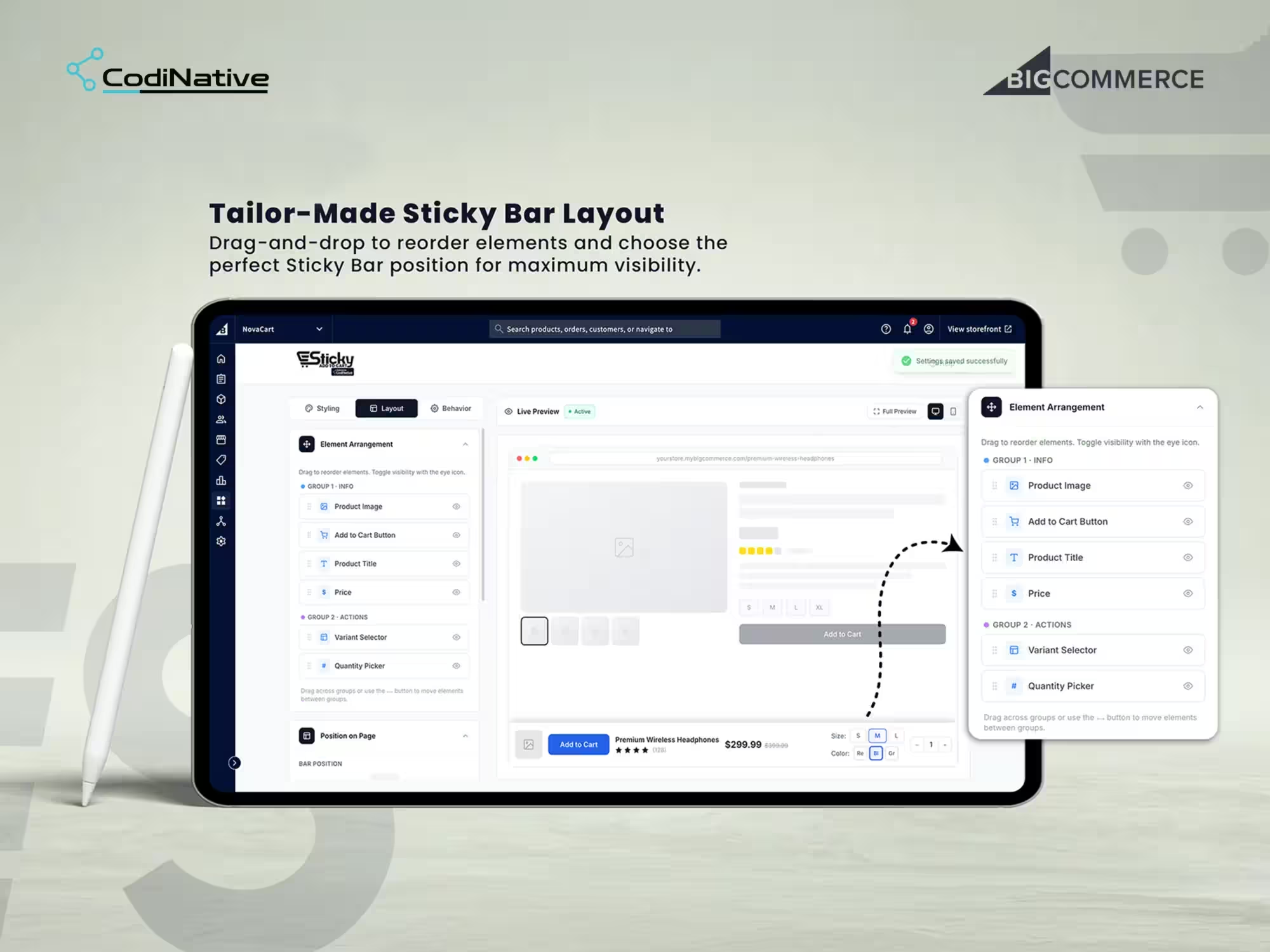
The Layout tab gives merchants complete control over what appears in the sticky bar and in what order. Elements sit in two groups. Group 1 Info holds Product Image, Add to Cart Button, Product Title, and Price. Group 2 Actions holds Variant Selector and Quantity Picker. Merchants drag elements to reorder within groups or move them between groups entirely. Each element has an independent visibility toggle show or hide without deleting it from the configuration. A Position on Page control sets the bar to the top or bottom of the viewport. Every rearrangement and visibility change reflects in the live preview immediately. A “Settings saved successfully” toast confirms when the configuration is committed.

02

03

Feature 03

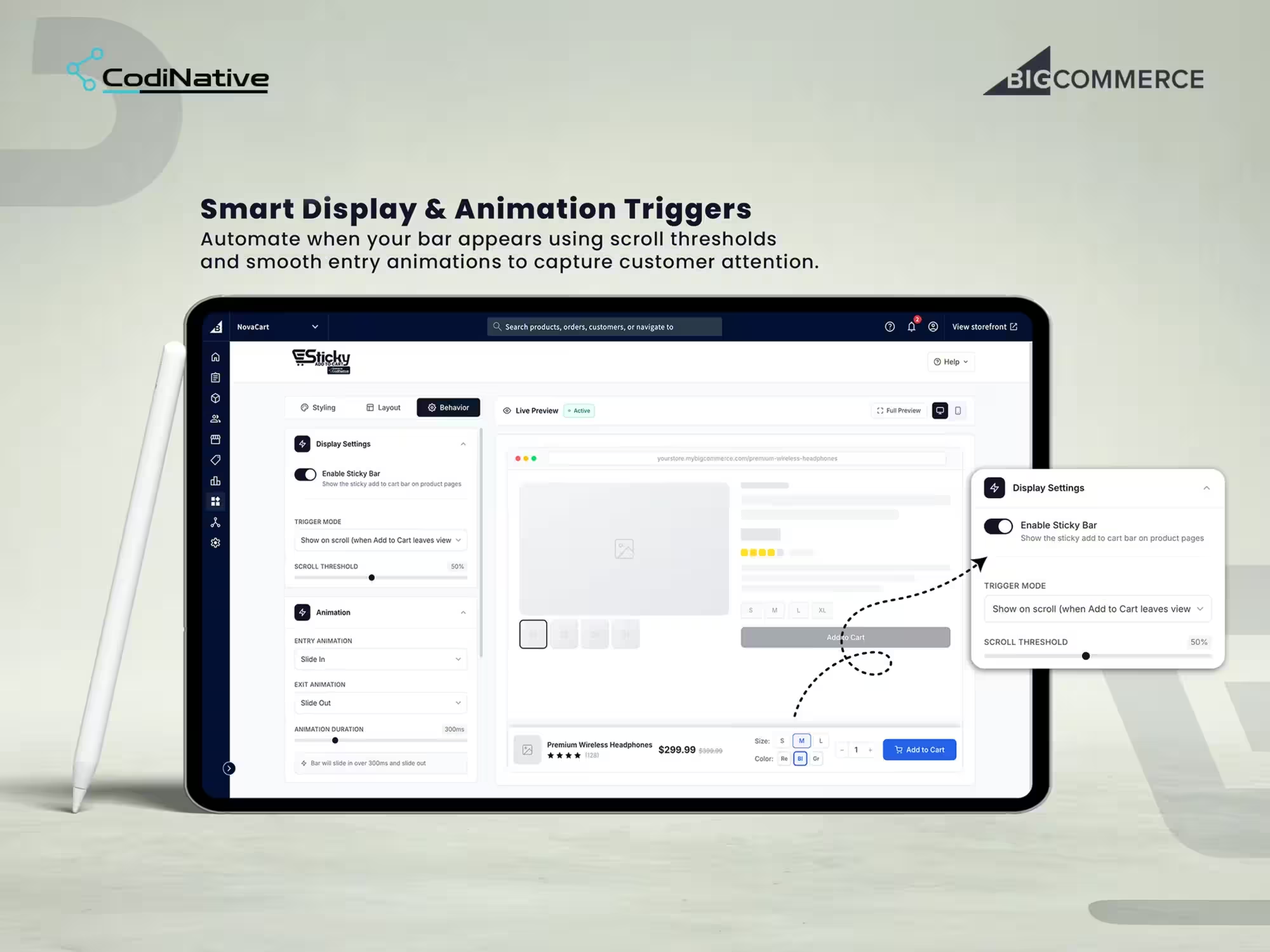
Behavior Panel: Scroll Triggers & Animations

The Behavior tab controls when the sticky bar appears and how it moves. Trigger Mode sets the appearance condition the default and most effective setting is Show on scroll when the original Add to Cart button leaves the viewport, meaning the sticky bar activates exactly when the native button disappears and hides when the customer scrolls back up. The bar never competes with the native button. Scroll Threshold is a percentage slider it sets how far down the page the customer must scroll before the bar activates. Entry Animation and Exit Animation are independent dropdowns Slide In, Slide Out, Fade, and other options. Animation Duration is set in milliseconds with a slider. A plain-language summary at the bottom of the panel describes the full configuration in one sentence so merchants always know exactly what behavior they have set before saving.

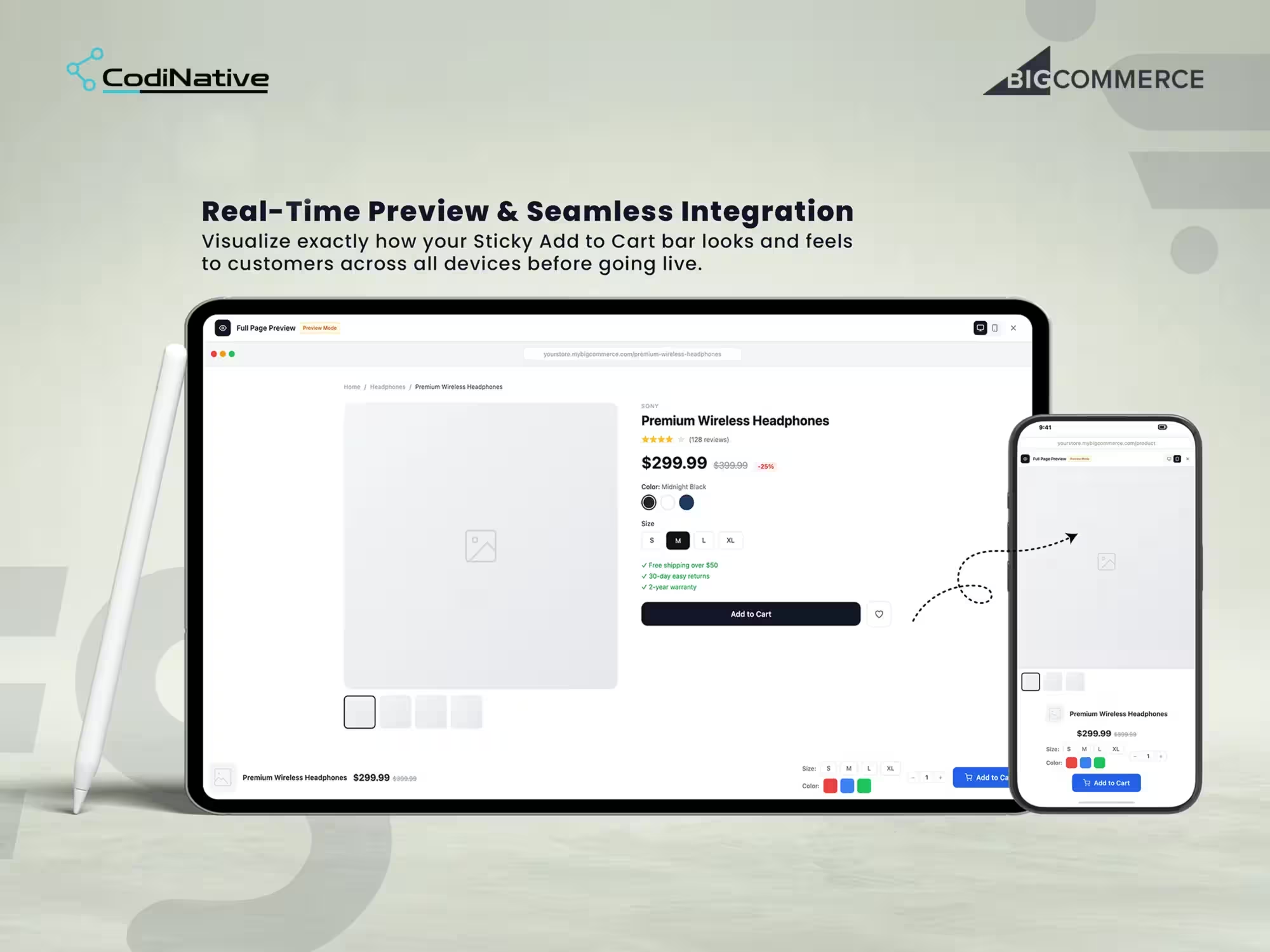
Real-Time Preview: Desktop & Mobile

Every change in every panel renders in the live preview pane without requiring a save. The preview renders an accurate product page breadcrumb, product image, title, price, ratings, variant selectors, and description with the sticky bar displayed at its configured position with its configured styling and element arrangement. A Full Preview button opens a full-page isolated preview in a clean window so merchants can scroll through a real product page experience and verify the scroll trigger fires at the right point, the animation plays correctly, and the bar looks right at both viewport sizes. The Desktop and Mobile viewport toggle inside the preview pane resizes the preview so merchants verify mobile rendering before activating on the live store.

04

01

Feature 01

Visual Form Builder

The builder splits into a field palette and a real-time live preview. Drag a field in, the preview updates immediately. Thirteen field types across four groups.

Basic Inputs — Text · Email · Phone · Number
Selection Fields — Textarea · Select · Radio · Checkbox
Address Fields — Country · State/Province
Special Fields — Date · File · URL

A theme editor handles form colors, typography, and button styles — no CSS needed. First Name, Last Name, Email, and Password are locked because BigCommerce requires them to create a customer through the REST API v3. Desktop and Mobile viewport toggles let merchants verify the form renders correctly before it goes live.

Core Features

Architecture

Registered through the BigCommerce App Development Framework. OAuth 2.0 handles authentication through a standard handshake identical to every app in the BigCommerce App Marketplace. Customer creation uses the REST API v3 Customers endpoint. The active form injects into the storefront through the Scripts API. Submission and approval events fire through Webhooks that trigger email dispatch the moment a status changes. The dashboard runs on BigDesign tokens for native control panel styling with custom React components for the form builder and preview.

Layer Technology
App Framework
App Framework
Authentication
OAuth 2.0
Customer Creation
BigCommerce REST API v3
Storefront Injection
Scripts API
Event Layer
Webhooks
Admin UI
BigDesign + React
Backend
Node.js
Database
PostgreSQL
Email
Transactional Email API

What Was Shipped

Deliverables

BigCommerce app with OAuth 2.0 install flow and native control panel integration

BigCommerce app with OAuth 2.0 install flow and native control panel integration

Styling panel bar appearance: background color, gradient, border radius, padding, shadow, border width, opacity

Styling panel bar appearance: background color, gradient, border radius, padding, shadow, border width, opacity

Typography & Colors title, price, and button text styling without CSS

Typography & Colors title, price, and button text styling without CSS

Drag-and-drop layout builder element arrangement across Info and Actions groups with per-element visibility toggles

Drag-and-drop layout builder element arrangement across Info and Actions groups with per-element visibility toggles

Bar position control top or bottom viewport placement

Bar position control top or bottom viewport placement

Behavior panel trigger mode, scroll threshold slider, entry animation, exit animation, animation duration

Behavior panel trigger mode, scroll threshold slider, entry animation, exit animation, animation duration

Plain-language behavior summary so merchants always understand the active configuration

Plain-language behavior summary so merchants always understand the active configuration

Real-time live preview pane with Desktop and Mobile viewport toggle

Real-time live preview pane with Desktop and Mobile viewport toggle

Full-page isolated preview mode for end-to-end scroll behavior testing before going live

Full-page isolated preview mode for end-to-end scroll behavior testing before going live

Scripts API injection scoped to product pages only zero Stencil theme modification

Scripts API injection scoped to product pages only zero Stencil theme modification

Automatic script cleanup on uninstall storefront returns to original state

Automatic script cleanup on uninstall storefront returns to original state

BigCommerce app with OAuth 2.0 install flow and native control panel integration

No-code visual form builder — 13 field types, live preview, theme editor

Multi-form library with independent configurations and one-click exclusive activation

Approval workflow engine — Pending · Approved · Rejected · Resubmission

Filterable, searchable request management queue

Applicant detail view with full submission data and instant action buttons

Five branded transactional email templates — merge variables, Custom HTML, live preview

Analytics dashboard with real-time approval rate and recent submissions

Native BigDesign UI throughout — matches BigCommerce admin exactly

Common Questions

Frequently Asked Questions

A sticky add-to-cart bar is a fixed UI element that stays visible at the top or bottom of the product page viewport as customers scroll. It displays the product title, price, variant selectors, quantity picker, and Add to Cart button so the purchase action is always accessible regardless of scroll position. On BigCommerce, implementing this without an app requires custom Stencil development that breaks on theme updates. This app injects through the Scripts API and is entirely theme-agnostic.

No. The app deploys entirely through the BigCommerce Scripts API. No Stencil templates, no templates/components, no assets/js files are modified at any point. The bar loads as a managed script on product pages only. Theme updates, theme switches, and theme rollbacks have no effect on the app. Uninstalling removes the script automatically and the storefront returns to its original state with nothing left behind.

Two scopes only: store_themes_manage to inject the sticky bar script through the Scripts API, and store_v2_information_read_only for store context including currency and locale. No customer, order, payment, catalog write, or financial data scopes are requested at any point.

Yes. Because the app injects through the Scripts API rather than modifying Stencil templates, it works on Cornerstone and any custom Stencil theme without per-theme configuration or a pre-deployment theme audit.

Yes. The Behavior panel has a Trigger Mode dropdown and a Scroll Threshold slider. The default trigger is Show on scroll when the original Add to Cart button leaves the viewport the bar appears exactly when the native button is no longer visible and disappears when the customer scrolls back up so the two never compete. The scroll threshold is adjustable for stores where the default trigger point needs fine-tuning.

Yes. Variant Selector and Quantity Picker are available elements in the Layout panel's Actions group. Merchants show or hide them independently and reorder them relative to other bar elements using drag-and-drop. The variant selector in the bar is fully functional customers select size, color, or other variants directly in the sticky bar without scrolling back up to the native selector.

Yes. The bar is fully responsive and renders correctly across desktop, tablet, and mobile viewports. The admin includes a Mobile viewport toggle in the live preview so merchants verify the bar renders and behaves correctly on smaller screens before activating on the live store.

An app of this scope real-time customization UI with three control panels, Scripts API injection, live preview with mobile toggle, drag-and-drop layout builder, and scroll behavior controls takes Codinative six to ten weeks from discovery to BigCommerce App Marketplace submission, covering OAuth setup, Scripts API integration, admin UI build, cross-device QA, and the BigCommerce security review.

What is a custom signup form app for BigCommerce?

It replaces the native BigCommerce customer registration with a configurable form that routes every submission into a merchant-controlled approval workflow. The merchant collects whatever data the business needs, reviews applications from a centralized dashboard, and approves or rejects them before a customer account is created in BigCommerce through the REST API v3. It installs directly into the control panel through the App Development Framework no third-party dashboard, no separate login.

A script tag renders a form in the storefront but cannot create customers, listen to Webhooks, or build an admin UI inside the BigCommerce control panel. The App Development Framework provides OAuth 2.0 authentication and authorized REST API v3 access both required for an approval workflow that produces real customer records with full attribute data in BigCommerce. Any solution not built on the App Development Framework has no reliable path to the customer API.

Add Your Heading Text Here Add Your Heading Text Here Add Your Heading Text Here Add Your Heading Text Here Add Your Heading Text Here

Three at install. store_v2_customers to create approved customers through the REST API v3. store_themes_manage to inject the active form into the storefront via the Scripts API. store_v2_information_read_only for store context currency, locale, platform name. No payment, order, catalog, or financial data scopes are requested.

Yes. The approval workflow, custom fields for business qualification trade pricing eligibility, company type, purchase intent, order volume and the applicant detail view with instant actions make this a direct fit for wholesale gating, trade pricing programs, B2B Edition onboarding, and any merchant who needs to qualify buyers before granting account access.

Yes. Every saved form keeps its own field configuration and theme independently. Merchants build once, deactivate after the campaign, reactivate next time with one toggle. Nothing is rebuilt. Wholesale forms, seasonal forms, and standard forms all live in the same library and switch in a single click.

Yes. Codinative builds both App Marketplace apps and private single-client apps. A private app installs into one store only, carries the merchant's branding throughout, and bypasses the marketplace review timeline. It is the right choice when the app handles logic specific to one merchant's operation.

Six to ten weeks from discovery to App Marketplace submission. That covers OAuth setup, REST API v3 integration, dashboard UI, cross-device QA, and the BigCommerce security review. Private apps without the marketplace review run slightly faster.

Codinative is a verified BigCommerce Partner.

Codinative is a verified BigCommerce Partner. Custom apps, B2B Edition, Stencil and Catalyst storefronts, REST API v3 integrations BigCommerce only. Every project, every developer, every day.
Scroll to Top