Rosa Scrubs Build Your Set  BigCommerce Custom Bundle Builder

Type

BigCommerce Custom Development · Interactive UX · Product Bundling

Role

BigCommerce Stencil · Handlebars.js · JavaScript · Custom CSS · Storefront Cart API

Stack

BigCommerce Stencil · Handlebars.js · JavaScript · Custom CSS · Storefront Cart API

Status

01

The Problem

BigCommerce ships every merchant the same registration form. It collects a name, an email, and a password, and it creates an account on the spot  no review, no qualification, no custom data.

That works for a standard retail store. It breaks immediately for merchants running wholesale programs, trade pricing, B2B onboarding, or members-only access. They need to know who is signing up before granting access. They need custom fields  company name, trade pricing eligibility, purchase intent, tax ID. They need an approval step that sits between the application and the account.

Without a solution built for BigCommerce, merchants were stitching together generic form plugins with no real platform integration, creating customers manually inside the admin, and managing approvals through email threads. Submission data lived in spreadsheets. Nothing connected back to the customer record in BigCommerce. The process was slow, inconsistent, and entirely dependent on someone remembering to follow up.

02

The Solution

Codinative built a custom BigCommerce app that replaces the default registration flow with a controlled, branded, fully automated onboarding pipeline.

It installs natively into the merchant’s BigCommerce control panel through the App Development Framework, authenticated via OAuth 2.0. Customer creation on approval goes through the REST API v3. The active form injects into the storefront through the Scripts API. Every state change fires through Webhooks that trigger the correct branded email the moment a decision is made.

Merchants build forms visually without writing code. Every submission enters an approval queue. Approvals create a real customer in BigCommerce with all submitted data attached. Rejections and resubmission requests send the right branded email automatically. The entire pipeline lives in one dashboard inside the control panel. No spreadsheets. No manual emails. No developer needed after install.

Project Framework

Situation · Task · Action · Result

S Situation

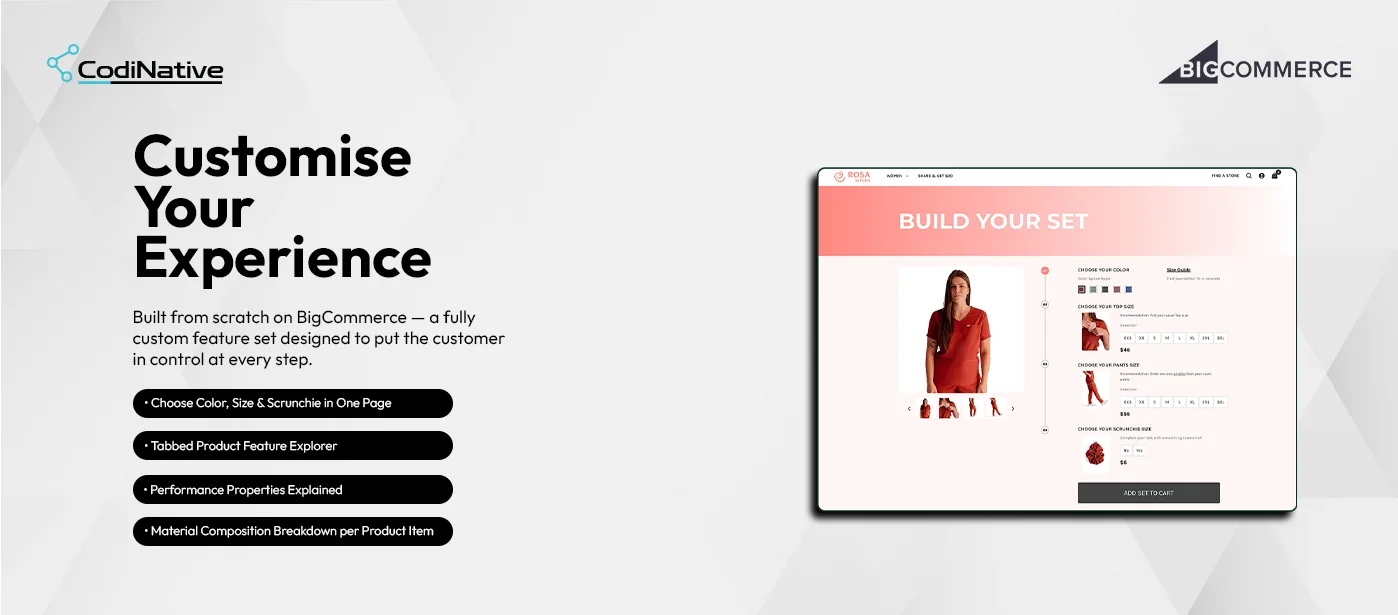
Rosa Scrubs customers needed to purchase a coordinated scrub set top, pants, and accessory but BigCommerce’s default product structure placed each item on a separate page with separate add-to-cart flows. The experience was fragmented and made color coordination across items the customer’s problem to solve.

T Task

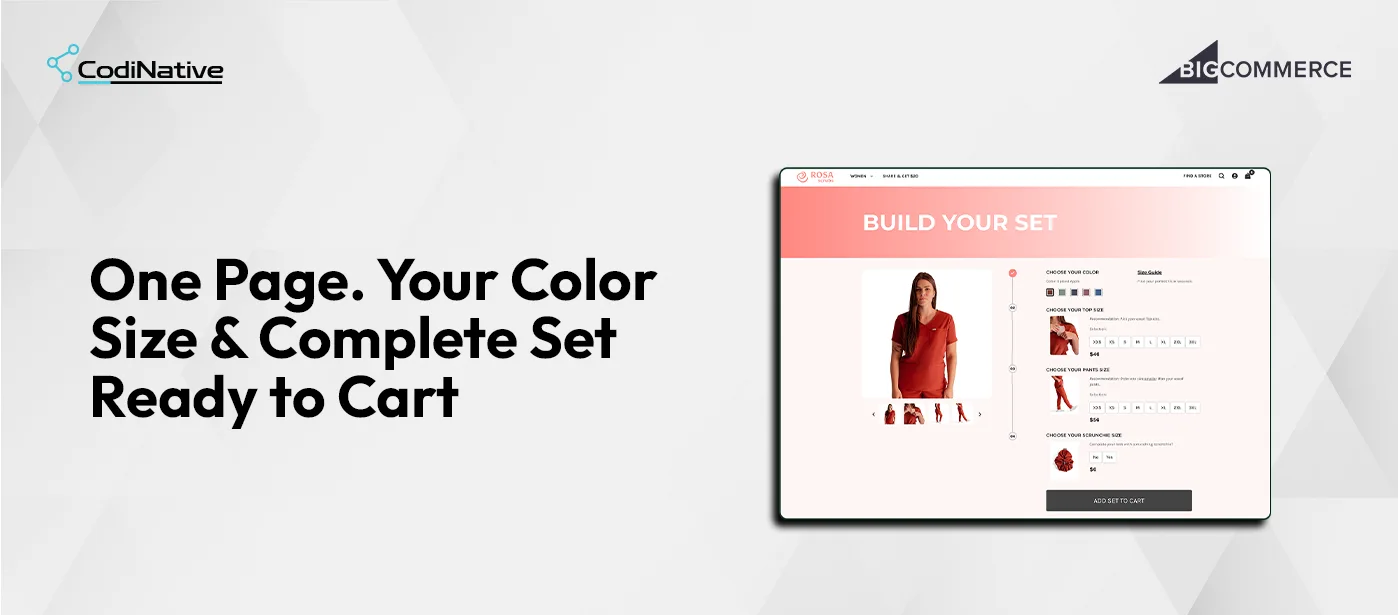
Build a single-page interactive set builder where customers choose color, top size, pants size, and optional scrunchie in one guided flow, then add the complete set to cart in one action without navigating to any individual product pages.

A Action

Built a custom Build Your Set page on BigCommerce Stencil with four numbered steps: color swatches updating the live product image on selection, top size grid with per-item sizing recommendation, pants size grid with its own recommendation noting pants fit one size smaller, and scrunchie Yes/No toggle with price. Implemented a single Add Set to Cart button that batches all selected variants into one Storefront Cart API call. Built a separate tabbed product feature section with Tops, Pants, and Fabric tabs each showing performance properties, a six-image feature gallery with captions, and material composition breakdown with exact percentages: 76% Polyester / 18% Rayon / 6% Spandex for tops, 80% Polyester / 15% Cotton / 5% Spandex for pants.

R Result

Built a custom Build Your Set page on BigCommerce Stencil with four numbered steps: color swatches updating the live product image on selection, top size grid with per-item sizing recommendation, pants size grid with its own recommendation noting pants fit one size smaller, and scrunchie Yes/No toggle with price. Implemented a single Add Set to Cart button that batches all selected variants into one Storefront Cart API call. Built a separate tabbed product feature section with Tops, Pants, and Fabric tabs each showing performance properties, a six-image feature gallery with captions, and material composition breakdown with exact percentages: 76% Polyester / 18% Rayon / 6% Spandex for tops, 80% Polyester / 15% Cotton / 5% Spandex for pants.

Core Features

01

Feature 01

Feature 01 Build Your Set: Four-Step Guided Selection

The Build Your Set page is a numbered vertical flow. Each step is visually distinct with a step number, a product thumbnail for that item, a sizing recommendation, and the selection controls. Step 01 Choose Your Color shows six color swatches with the current color name displayed beneath the label. Color: Spiced Apple is selected in the screenshots. Every swatch selection updates the main product image on the left to show the scrub set in that color implemented through JavaScript listening to swatch click events and swapping the image source against a color-to-image map stored as a Handlebars.js data object on the page template. Step 02 Choose Your Top Size shows the top product thumbnail, the recommendation “Pick your usual Top size”, and a size grid from XXS to 3XL with the unit price of $46 below. Size buttons are styled as flat rectangular chips selected state uses a filled background to confirm the choice clearly. Step 03 Choose Your Pants Size shows the pants thumbnail, the recommendation “Order one size smaller than your usual pants” a critical detail that prevents the most common return reason for this product and the same XXS to 3XL grid at $56. Step 04 Choose Your Scrunchie Size shows the scrunchie product image and a simple Yes / No toggle at $6 with the note “Complete your look with a matching scrunchie?” At the bottom of the step flow, a full-width Add Set to Cart button submits all selected items to the cart. The button is inactive until all required selections color, top size, pants size are made. Scrunchie is optional and defaults to No.

Feature 02

Feature 02 Real-Time Color Image Update

When a customer selects a color swatch, the product image on the left side of the page updates immediately to show the scrub set in that color without a page reload. This is a JavaScript-driven image swap not a BigCommerce native variant image feature, which does not work across multiple product IDs on a single page. The implementation stores a color-to-image-set mapping in the page template as a JSON object rendered through Handlebars.js. On swatch selection, JavaScript reads the clicked color key, retrieves the corresponding image URLs from the mapping object, and updates the main image and thumbnail carousel sources. The color name display below the “Choose Your Color” label also updates to match. This gives customers visual confirmation that the color they are selecting applies to the complete set top and pants together before they proceed to sizing.

02

03

Feature 01

Feature 03 Tabbed Product Feature Explorer

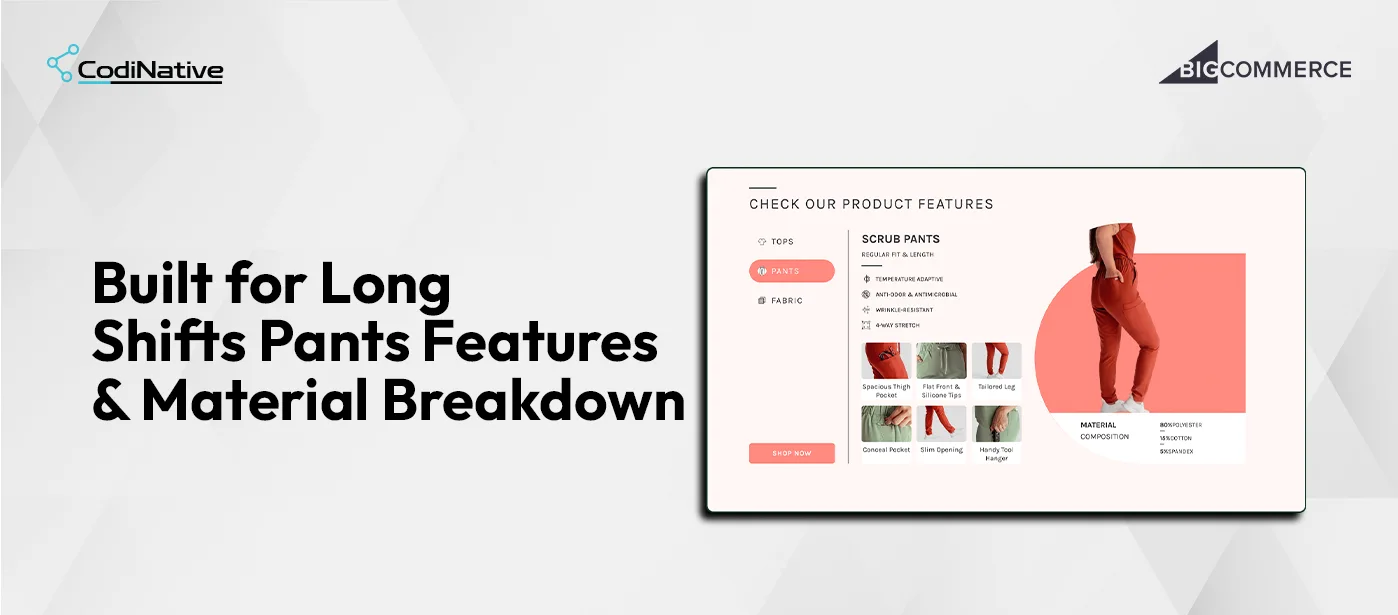
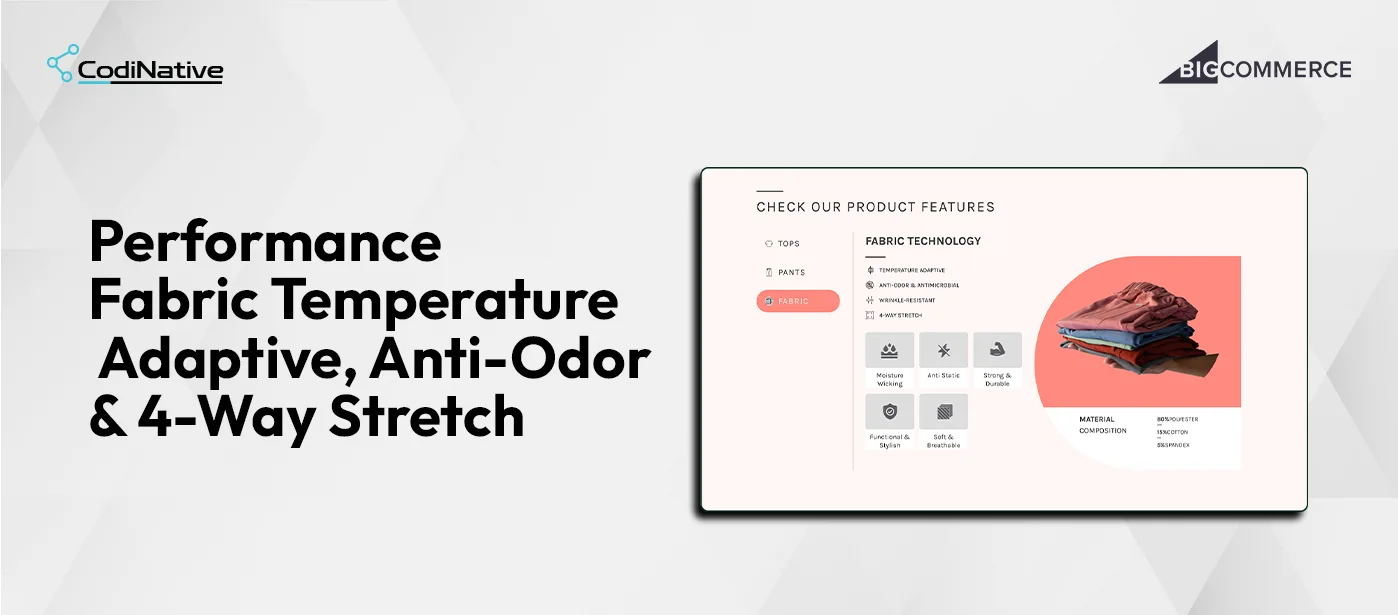
Below the Build Your Set section, a Check Our Product Features section gives customers a way to understand what they are buying before committing. Three tabs Tops, Pants, Fabric each surface a different view of the product. Tops tab shows the Scrub Top with fit type Regular Fit, four performance properties with line icons Temperature Adaptive, Anti-Odor & Antimicrobial, Wrinkle-Resistant, 4-Way Stretch a six-image feature gallery with captions: Badge Holder Pocket, Chic V-Neck, Perfect Fit, Convenient Top Pocket, Sleek Sleeves, Discreet Bottom Pockets. Material Composition is shown as 76% Polyester / 18% Rayon / 6% Spandex. Pants tab shows Scrub Pants with Regular Fit & Length, the same four performance properties, and a six-image feature gallery: Spacious Thigh Pocket, Flat Front & Silicone Tips, Tailored Leg, Conceal Pocket, Slim Opening, Handy Tool Hanger. Material Composition: 80% Polyester / 15% Cotton / 5% Spandex. Fabric tab shows Fabric Technology with the same four performance properties, a five-icon feature grid Moisture Wicking, Anti Static, Strong & Durable, Functional & Stylish, Soft & Breathable and Material Composition: 80% Polyester / 15% Cotton / 5% Spandex with a product photo of the fabric stack. Tab switching is handled in JavaScript clicking a tab label adds an active class, shows the corresponding content panel, and hides the others. No page reload, no API call. The active tab renders its pill button in the Rosa Scrubs coral brand color.

Feature 04

Feature 04 Single Add Set to Cart via Storefront Cart API
When a customer clicks Add Set to Cart, the JavaScript layer collects the selected variant IDs for the top, pants, and scrunchie (if Yes was selected), and submits them to the BigCommerce Storefront Cart API as a single POST /api/storefront/carts request with a lineItems array containing each selected product and its quantity of 1. This means all selected items land in the cart in one network request. The customer does not see three separate “Added to cart” events. The cart count increments once to reflect the full set. The customer’s experience is that they built a set and added a set not that they added three individual products. If the customer has already started a cart in this session, the request uses POST /api/storefront/carts/{cartId}/items to add to the existing cart rather than creating a new one. Session cart ID is retrieved from the Storefront Cart API GET /api/storefront/cart call that fires on page load.

04

01

Feature 01

Visual Form Builder

The builder splits into a field palette and a real-time live preview. Drag a field in, the preview updates immediately. Thirteen field types across four groups.

Basic Inputs — Text · Email · Phone · Number
Selection Fields — Textarea · Select · Radio · Checkbox
Address Fields — Country · State/Province
Special Fields — Date · File · URL

A theme editor handles form colors, typography, and button styles — no CSS needed. First Name, Last Name, Email, and Password are locked because BigCommerce requires them to create a customer through the REST API v3. Desktop and Mobile viewport toggles let merchants verify the form renders correctly before it goes live.

Core Features

Architecture

Registered through the BigCommerce App Development Framework. OAuth 2.0 handles authentication through a standard handshake identical to every app in the BigCommerce App Marketplace. Customer creation uses the REST API v3 Customers endpoint. The active form injects into the storefront through the Scripts API. Submission and approval events fire through Webhooks that trigger email dispatch the moment a status changes. The dashboard runs on BigDesign tokens for native control panel styling with custom React components for the form builder and preview.

Layer Technology
App Framework
App Framework
Authentication
OAuth 2.0
Customer Creation
BigCommerce REST API v3
Storefront Injection
Scripts API
Event Layer
Webhooks
Admin UI
BigDesign + React
Backend
Node.js
Database
PostgreSQL
Email
Transactional Email API

What Was Shipped

Deliverables

Custom Build Your Set page on BigCommerce Stencil no third-party app or plugin

Custom Build Your Set page on BigCommerce Stencil no third-party app or plugin

Four-step guided selection flow color, top size, pants size, scrunchie toggle

Four-step guided selection flow color, top size, pants size, scrunchie toggle

Real-time color image update on swatch selection via JavaScript image swap

Real-time color image update on swatch selection via JavaScript image swap

Per-step sizing recommendations specific to each product item

Per-step sizing recommendations specific to each product item

Size grids XXS through 3XL with clear selected state styling

Size grids XXS through 3XL with clear selected state styling

Single Add Set to Cart button all selected variants submitted in one Storefront Cart API call

Single Add Set to Cart button all selected variants submitted in one Storefront Cart API call

Existing cart session detection adds to current cart rather than creating a new one

Existing cart session detection adds to current cart rather than creating a new one

Tabbed product feature explorer Tops, Pants, Fabric tabs

Tabbed product feature explorer Tops, Pants, Fabric tabs

Per-tab content product name, fit type, four performance properties, six-image feature gallery with captions

Per-tab content product name, fit type, four performance properties, six-image feature gallery with captions

Material composition breakdown per item with exact percentages

Material composition breakdown per item with exact percentages

Full Rosa Scrubs brand system coral accent color, typography, and layout applied throughout

Full Rosa Scrubs brand system coral accent color, typography, and layout applied throughout

Responsive layout functions correctly on desktop and mobile viewport sizes

Responsive layout functions correctly on desktop and mobile viewport sizes

BigCommerce app with OAuth 2.0 install flow and native control panel integration

No-code visual form builder — 13 field types, live preview, theme editor

Multi-form library with independent configurations and one-click exclusive activation

Approval workflow engine — Pending · Approved · Rejected · Resubmission

Filterable, searchable request management queue

Applicant detail view with full submission data and instant action buttons

Five branded transactional email templates — merge variables, Custom HTML, live preview

Analytics dashboard with real-time approval rate and recent submissions

Native BigDesign UI throughout — matches BigCommerce admin exactly

Common Questions

Frequently Asked Questions

A custom bundle builder on BigCommerce is a single-page experience that lets customers select multiple related products each with their own variants and add them all to cart in one action. It is built on BigCommerce Stencil using the Storefront Cart API to batch multiple product line items into a single cart request. It is not a native BigCommerce feature and cannot be configured through the admin it requires custom Stencil development.

The Storefront Cart API accepts a lineItems array in a single POST request. Each item in the array carries a productId, variantId, and quantity. When the customer clicks Add Set to Cart, JavaScript collects the selected variant IDs for the top, pants, and scrunchie and submits them together in one array. BigCommerce processes all three as a single cart operation. The customer sees one cart update rather than three.

BigCommerce's native variant image system is per-product it cannot update an image based on a color selection that spans multiple product IDs on the same page. The color-to-image mapping is stored as a JSON object rendered into the Stencil template via Handlebars.js at page load. When a color swatch is clicked, JavaScript reads the color key from the clicked element, retrieves the corresponding image URLs from the pre-rendered JSON object, and updates the main image and thumbnail carousel source attributes. No API call is made the swap is instantaneous.

This is the actual Rosa Scrubs sizing guidance for their pants product. The recommendation "Order one size smaller than your usual pants" is surfaced on the pants step to prevent the most common return reason customers who buy their usual size in pants and find them too large. Surfacing this recommendation at the point of size selection, before the item is in the cart, reduces post-purchase dissatisfaction without requiring any customer service interaction.

Yes. The pattern Stencil template with a JSON configuration object, JavaScript-driven step selection, and Storefront Cart API batch submission applies to any BigCommerce store that sells products customers naturally buy together. Apparel sets, skincare routines, tool kits, uniform packages. The number of steps, the product IDs, the sizing recommendations, and the tab content all come from the template configuration. A new bundle page for a different product set requires updating the configuration, not rewriting the implementation.

No. The entire implementation lives in a custom BigCommerce Stencil page template, a JavaScript file, and a CSS file. There is no third-party app, no monthly subscription, and no external dependency beyond the native BigCommerce Storefront Cart API that is available on every BigCommerce store.

A custom BigCommerce bundle builder of this scope guided step flow, color image swap, per-step sizing recommendations, tabbed feature explorer with photography, and Storefront Cart API batch submission takes Codinative three to six weeks from discovery to live deployment, depending on the number of products in the bundle and the complexity of the feature content.

What is a custom signup form app for BigCommerce?

It replaces the native BigCommerce customer registration with a configurable form that routes every submission into a merchant-controlled approval workflow. The merchant collects whatever data the business needs, reviews applications from a centralized dashboard, and approves or rejects them before a customer account is created in BigCommerce through the REST API v3. It installs directly into the control panel through the App Development Framework no third-party dashboard, no separate login.

A script tag renders a form in the storefront but cannot create customers, listen to Webhooks, or build an admin UI inside the BigCommerce control panel. The App Development Framework provides OAuth 2.0 authentication and authorized REST API v3 access both required for an approval workflow that produces real customer records with full attribute data in BigCommerce. Any solution not built on the App Development Framework has no reliable path to the customer API.

Add Your Heading Text Here Add Your Heading Text Here Add Your Heading Text Here Add Your Heading Text Here Add Your Heading Text Here

Three at install. store_v2_customers to create approved customers through the REST API v3. store_themes_manage to inject the active form into the storefront via the Scripts API. store_v2_information_read_only for store context currency, locale, platform name. No payment, order, catalog, or financial data scopes are requested.

Yes. The approval workflow, custom fields for business qualification trade pricing eligibility, company type, purchase intent, order volume and the applicant detail view with instant actions make this a direct fit for wholesale gating, trade pricing programs, B2B Edition onboarding, and any merchant who needs to qualify buyers before granting account access.

Yes. Every saved form keeps its own field configuration and theme independently. Merchants build once, deactivate after the campaign, reactivate next time with one toggle. Nothing is rebuilt. Wholesale forms, seasonal forms, and standard forms all live in the same library and switch in a single click.

Yes. Codinative builds both App Marketplace apps and private single-client apps. A private app installs into one store only, carries the merchant's branding throughout, and bypasses the marketplace review timeline. It is the right choice when the app handles logic specific to one merchant's operation.

Six to ten weeks from discovery to App Marketplace submission. That covers OAuth setup, REST API v3 integration, dashboard UI, cross-device QA, and the BigCommerce security review. Private apps without the marketplace review run slightly faster.

Scroll to Top